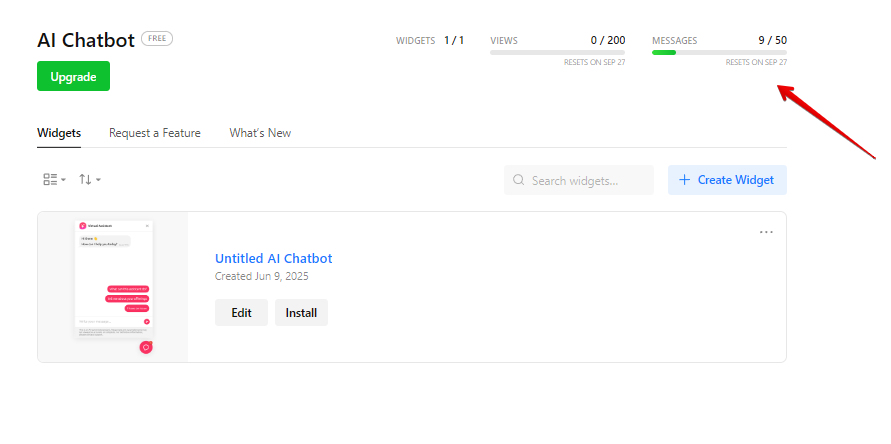
Currently, it’s only possible to see that the message limit is over in the widget notification itself:

It’d be great if we could be notified via email or if the message usage can be tracked somewhere in the dashboard.
Currently, it’s only possible to see that the message limit is over in the widget notification itself:
Where can I find the message counter? I have a basic package and I only see the page view counter. How do I find out how many messages have been sent? How does the message counter work - is each conversation start a message or is each query a message?
Hi there, @Dawid 
I’m really sorry, but the message counter isn’t available at the moment. I totally agree that it would be a useful feature, and we’ll try to consider adding it in the future.
In the meantime, if you’d like to check the number of messages used, feel free to reach out, and we can pull that info for you. As of now, 108 messages have been sent from your AI Chatbot.
Regarding the counting logic, each message (not the conversation) sent by users is counted as 1 message.
Thx a lot!
It would be good to see the message limit in the chatbot editor.
I’ve been trying to fine-tune the replies and exceeded the message limit just with that.
If I had known that the testing inside the editor counts towards the message limit, I would not have done that. Now I have to wait for one month for the limit to reset.
Hey there, @Sinan_Saglam 
Many thanks for the feedback!
This idea is already on the Wishlist, and I’ve merged your comment with it. If more users upvote this idea, it might be considered in the future 
I’d like to suggest this as a very important feature request.
Since the chatbot will shut down if either the Messages or Views limits of the license are exceeded, customers need a clear, simple way to monitor both of those metrics throughout the month. Without that visibility, there’s a real risk of unintentional service interruptions, which makes it difficult to rely on the chatbot in a production environment.
I hope this can be prioritized as an critical request, since it directly affects the chatbot’s reliability from the user’s perspective.
If a real-time monitor isn’t feasible, perhaps Elfsight could consider an option similar to some US cell phone plans — allowing users to configure their account to automatically bump into the next pricing tier for that month only if limits are reached, so the chatbot continues to function without interruption.
This would be helpful for new deployments like ours, where we’re testing the AI messaging intensively now but don’t expect to use as many messages once things are fully configured.
Hey there, @Paul_D
Thank you so much for your constructive feedback!
We totally agree that tracking limit usage is important for users, and I’m excited to share that this feature is already in the works!
Right now, it’s going through Business Review stage, and if everything goes well in testing, we’re hoping to roll it out soon 
While we can’t share an exact timeline just yet, we’ll definitely keep you posted here with any updates