We’ve just rolled out a big update to enhance the form feature in our Appointment Booking app, addressing several popular Wishlist requests!
What’s inside the update?
Form settings simplified
You’ll now find all your form settings under the Settings tab of your widget’s settings. No more hunting around — everything’s neatly organized for easy access
One of the most requested features is finally here!
Your widgets got an option to add custom form fields for more flexibility. Whether it’s additional information from your users or unique data points, you can capture exactly what you need:
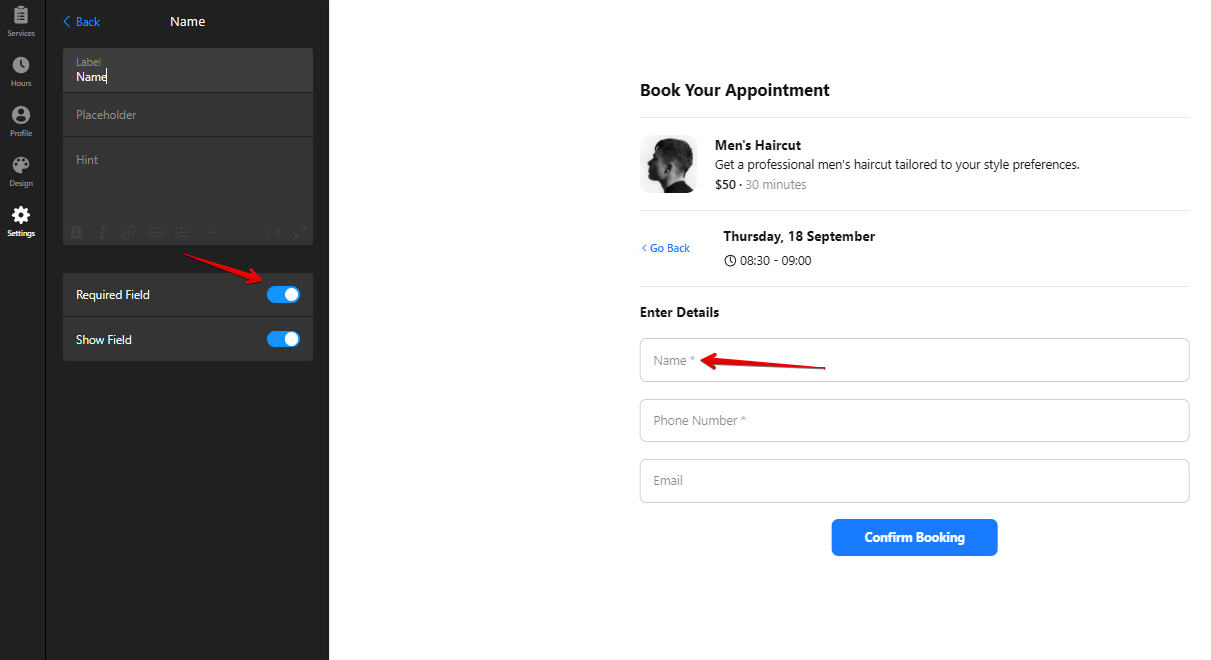
Plus, you can now customize the default fields (Name, Email, Phone Number, Notes) to fit your needs — set labels, placeholders, and hints to make everything more intuitive for your users:
This feature also gained a bunch of votes on the Wishlist!
The Notes field, which previously appeared only after clicking the “Add Notes” button, can now be shown immediately by simply enabling the Show field and Required field options:
I’ve just discovered your website and widget tools today.
Very good.
This tool is ALMOST exactly what I’ve been looking for.
I’m using your drop down to select between multiple locations, and another for multiple staff members. If this could be tied to:
the number of simultaneous bookings per time slot;