-
Issue description: Email confirmation is not being received by the people who booked, the i have followed every steps but still not working!!! HELP ME URGENTLY!!!
-
Link to the page with the widget in question: https://e56758595b1149d2be3665e44a44ea66.elf.site
2 Likes
Thats why i hate having an AI customer support, i need real technical person who can help me, not just advice what to do and give some steps that doesnt work.
2 Likes

I’m really sorry for the confusion, and I’ll do my best to sort this out for you!
I noticed that you’ve reached out via our AI Chatbot, and my colleague Victoria, our real agent from our Support Team has also been in touch with you. She checked your widget, and it looks like the confirmation went through on her end.
I also tried booking a slot myself and received the confirmation email, as shown here:

If you’ve already followed the steps Victoria suggested, but your clients still don’t receive confirmations, could you please send me an example of the client’s email address? It would help me investigate further:

If you’ve tested it with your own email, feel free to share it here, and I’ll take a look.
1 Like
After 8 tries, and after you replied, it worked again, i hope it will not happen again tomorrow as we are using this to book our clients, we cant showcase this app if it is not working. i hope it will not happen again and if i connect google calendar, it doesnt integrate as well that is why i disconnected it so it wont get any problems. this is too hard for us to keep this again and again every morning.
2 Likes
Hi there, @Gerard_Pelgone 
I am happy to hope the issue has been resolved on your end and hope it won’t occur anymore.
Also, I’d like to note that the confirmation emails should work fine with the Google Calendar integration enabled too.
If you decide to connect your widget to the Google Calendar and the issue with the confirmation emails appears again, please let us know. We’ll be happy to check it for you 
1 Like
I am experiencing similar issues with the same frustration! Customers see successful booking confirmation but nothing gets reserved on the calendar, no notifications are sent out! There should just be an error that is displayed and some notification of the attempt sent so that we can manually handle things when you are having downtimes and issues, this is outrageous!!!
1 Like
I am having this same issue and same experience! How come it just fails silently!?!? That is terrible and subpar, not what I signed up for!
1 Like
Hello @annae_tattoo,
I’m so sorry that you’re facing difficulties – I’ll do my best to make everything right!
Could you please provide me with a page where the Appointment Booking widget is installed? It would help us get to the bottom of this faster 
1 Like
Hi, its been more than 72 hours I contacted support, still no email answer. I have 3 different widgets; a floating inline one on our main page (can only post two links so I will skip posting this), and two inline at Book Your Appointment | annae.tattoo and Bestill time | annae.tattoo
1 Like
I have done extensive debugging over the past days, and after creating new widgets and trying to use them it only works once! After an initial successful booking no other appointment goes through!
I have tried from my phone on multiple browsers and on multiple computers with different OS and browsers and there is no difference! This experience matches what happened when supported looked into the case, the first time they do a booking its fine but not more than one booking is handled. I assume there is something hanging on your side of things that we can’t see and are not informed of, and that support just restarted once before testing it was fine but after the first run it gets borked again.
This MUST be improved and ofc fixed.
I expect that you implement proper error handling so that the booking confirmation is only shown after the calendar has been synced and the desired slot is no longer free and holds matching metadata which the user provided. This is the BARE minimum!
There should also be proper alerting when booking fail so that we can reach out to the clients ourselves while you fix whatever system errors you or your upstream providers might be experiencing. Silently failing and customers receiving a positive confirmation is the worst of all!!! I am certain that such an SLA is an expectation all of your clients who use and rely on widgets expect and only when failures like these (and the recent outages) happen do we feel the pain of you not properly implementing measures to meet them.
1 Like
Dear @annae_tattoo, I’m so sorry that you’re facing these issues with our Appointment booking 
We, along with the dev team, are so eager to get to the bottom of this for you! I see that my dear colleague Renata requested some tech details in the last email thread of your Support ticket. We’d appreciate if you provided them, as it will really help in the investigation
And I’ll definitely pass your feedback to my team – we’ll see if it’s possible to rethink the submission process.
1 Like
Again! Emails are not received from both ends. When will this not happen? 
1 Like
Everytime we have important booking. Nothing is receiving with confirmed booking. Why this keeps on happening?
1 Like
Dear, @Gerard_Pelgone,
I am so sorry that this issue occurred again on your end!
Now both the clients and the widget owner (you) don’t receive the booking notifications, is that correct?
I’ve just tried to book a slot in your widget and the notification has been successfully delivered to my email:
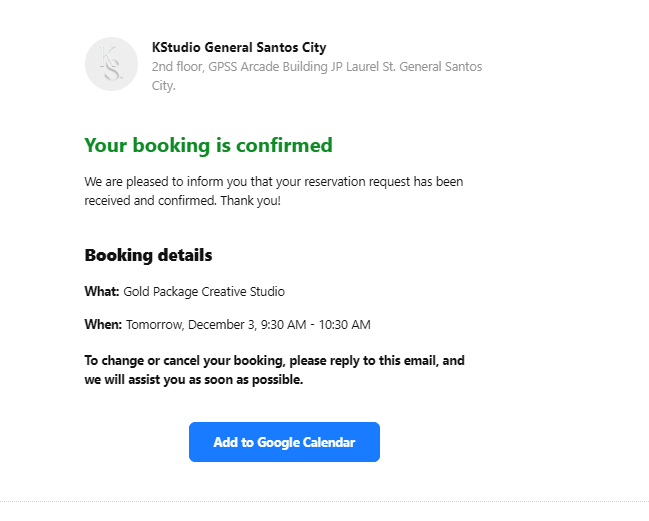
Could you please check your inbox (hello@kstudio.media) and let me know if you see a notification about my booking?
I have tried just now. Nothing is received.
1 Like
Got it, thank you so much!
I’ve passed it on to the devs. They’ll check things, and I’ll get back to you as soon as I have any news.
Thank you for your patience and understanding
Hi there, @Gerard_Pelgone
Thank you for waiting!
Our devs have tested your widget and couldn’t replicate the issue either. They’ve made some test bookings today. Have you received notifications about these reservations?
Also, could you please try to reserve the slot in your widget and let me know if you receive the notification? If no, please send me a screenshot of the Network tab in the dev tools after booking (right-click your website, choose “Inspect”, then “Network (All tab)” and click on the form submission request:

This video shows how you can do this: