Could we get a feature to where we can set up a schedule for AI Chat Bot to be active/inactive? At my company, during work hours, we have a Live Chat feature but at the end of business hours, it would be nice to have AI Chat Bot active.
Greetings and welcome to the Community, @Cameron_Tranter 
This is a great idea, thanks for sharing! We’ll try to think about it in the future, especially if more users upvote it 
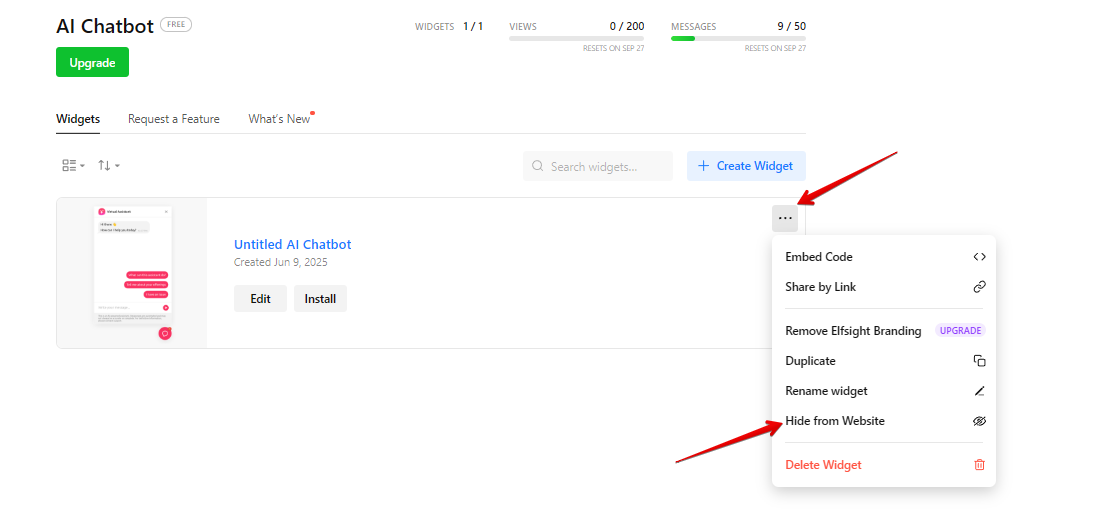
The only workaround at the moment is to manually show/hide the widget on the website using the button in the dashboard:
This is an excellent idea — hopefully it gets lots of upvotes!
I only want the AI bot responding when we are out of office. Can you make it so we can set the hours that this widget will display on the website similar to how the Whatsapp widget works?
Hey there, @Jordan_Knicely 
Many thanks for the feedback!
We already have a request for the schedule feature. I’ve moved your comment to the related thread, where we’ll keep you updated 
Hey everyone!
Our devs came up with a custom solution to set a schedule for the chatbot display:
const WIDGET_ID = 'WIDGET_ID';
const IS_PORTAL = true;
const TARGET_TIMEZONE = 'Europe/Rome'; // IANA Time Zone Database
const CHECK_INTERVAL = 1; // Minutes
// 1–7 (1 = Monday, 7 = Sunday)
const SCHEDULE = {
  1: {
    start: '21:00',
    end: '11:00'
  },
  2: {
    start: '21:00',
    end: '11:00'
  },
  3: {
    start: '21:00',
    end: '11:00'
  },
  4: {
    start: '21:00',
    end: '11:00'
  },
  5: {
    start: '21:00',
    end: '11:00'
  },
  6: {
    start: '21:00',
    end: '11:00'
  },
  7: {
    start: '21:00',
    end: '11:00'
  },
};
const getNowInTargetTZ = () => {
  const tzString = new Date().toLocaleString('en-US', {
    timeZone: TARGET_TIMEZONE,
  });
  return new Date(tzString);
};
const parseTimeToMinutes = (time) => {
  const [h, m] = time.split(':').map(Number);
  return h * 60 + m;
};
const checkShift = (dayIndex, nowMinutes, isYesterday) => {
  const schedule = SCHEDULE[dayIndex];
  if (!schedule) {
    return false;
  }
  const start = parseTimeToMinutes(schedule.start);
  const end = parseTimeToMinutes(schedule.end);
  if (start <= end) {
    return !isYesterday && nowMinutes >= start && nowMinutes <= end;
  } else {
    return isYesterday ? nowMinutes <= end : nowMinutes >= start;
  }
};
const isNowInSchedule = () => {
  const now = getNowInTargetTZ();
  const currentDay = now.getDay() === 0 ? 7 : now.getDay();
  const previousDay = currentDay === 1 ? 7 : currentDay - 1;
  const nowMinutes = now.getHours() * 60 + now.getMinutes();
  return (
    checkShift(currentDay, nowMinutes, false) ||
    checkShift(previousDay, nowMinutes, true)
  );
};
const updateVisibility = (widgetContainer) => {
  widgetContainer.style.display = isNowInSchedule() ? '' : 'none';
};
const addSchedule = () => {
  const widgetContainer = IS_PORTAL ?
    document.body.querySelector(`.es-portal-root[class*="${WIDGET_ID}"]`) :
    document.body.querySelector(`.es-embed-root[class*="${WIDGET_ID}"]`);
  if (!widgetContainer) {
    setTimeout(addSchedule, 250);
    return;
  }
  updateVisibility(widgetContainer);
  setInterval(
    () => updateVisibility(widgetContainer),
    CHECK_INTERVAL * 60 * 1000
  );
};
addSchedule();
In this script you should replace the following values:

WIDGET_ID — Replace with the ID of your widget.
IS_PORTAL — true if the widget is Floating , otherwise false .
TARGET_TIMEZONE — the timezone of the schedule in the format ‘Europe/Rome’.
CHECK_INTERVAL — the frequency of checking the current time.
SCHEDULE — the schedule. The numbers represent the days of the week: from 1 (Monday) to 7 (Sunday). For example, here are the working hours on Monday:
1: {
    start: '21:00',
    end: '11:00'
  },
If a day is a “day off” , it should simply be removed from the schedule.
2 Likes
Update: the feature is now in the works! 
It’s currently on the Design stage, but we’ll keep you updated on the progress here 
1 Like
Update: the feature moved to the Development stage