I just purchased the Whatsapp chat button plugin for a client and even though I followed all the steps to install it, it isn’t reflecting on the website. can anyone help?
I’ve used the plugin on other SS websites before and haven’t had an issue before.
I have a few other plugins installed such as the universal filter and product enquiry form.
Does this plug in clash with other non elfsight plugins?
Could you please double-check it? If the issue still persists on your end, please check your website in your browser’s incognito mode and let me know how it works there
Hey! Thanks so much! This is actually for another website. Do you think you could still help me? Its artenblu.in. The Whatsapp button is not reflecting there. Also on incognito mode :\
it isn’t linked to this account either…let me know if you need anything else from me
The 1st line of the installation code should be added next to the 2nd one, right after the closing tag . Please try to adjust the code placement and let me know if it helped
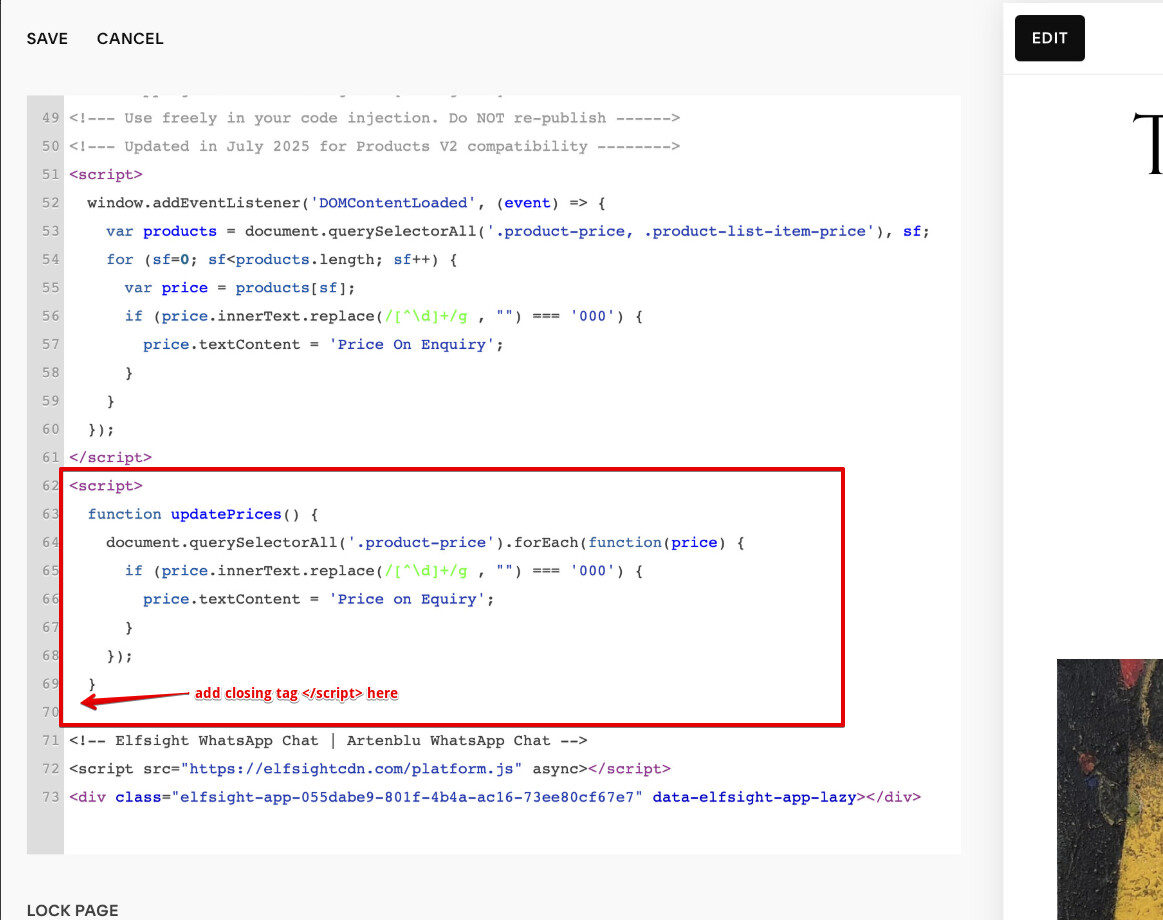
I hope I am not a bother, but I do not code! I have attached an image of where I have added the code given to me by Elfsight. I just hit ‘copy code’ and then pasted it where it told me to (code injection - footer).
The thing is that the script above the widget’s installation code doesn’t have a closing tag . This is why when you paste the installation code, it becomes a part of the script above and nothing works.
To fix it, please add a closing tag between your script and the widget’s installation code: