To make small image on hover text, like this.
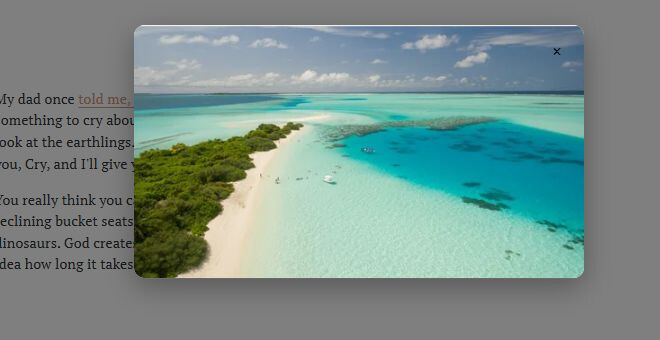
If you want to make it as tooltip style, like this. You can use Tooltips Plugin instead.

#1**.** First, create a page with Name/URL: Popup Text – /popup-text

#2**.** Add Image Blocks and find IDs.

#3**.** Edit the page containing the text you will hover > Enter this URL format.
#popup-hover=/popup-text#enter-image-block-id
For example
#popup-hover=/popup-text#block-yui_3_17_2_1_1755221325120_2092
Make sure Open in New Tab is disabled.
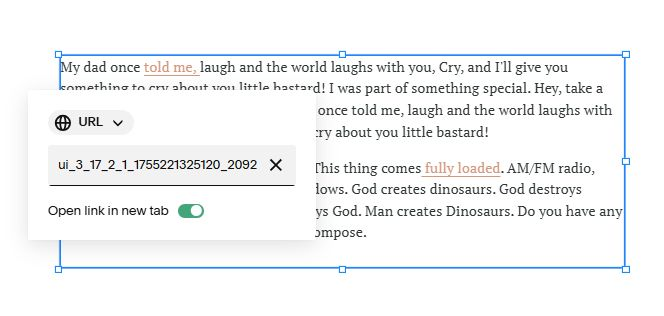
#popup-hover=/popup-text#block-yui_3_17_2_1_1760601045603_10939

(You can do similar if you have more text)
#4**.** Next, use this code to Custom CSS
/* Popup style */
.popup-overlay {
    position: fixed;
    top: 0;
    left: 0;
    width: 100%;
    height: 100%;
    background: rgba(0, 0, 0, 0.5);
    z-index: 9999;
    opacity: 0;
    visibility: hidden;
    transition: all 0.3s ease;
}
.popup-overlay.show {
    opacity: 1;
    visibility: visible;
}
.popup-modal {
    position: absolute;
    top: 50%;
    left: 50%;
    transform: translate(-50%, -50%) scale(0.8);
    background: #fff;
    border-radius: 12px;
    max-width: 500px;
    max-height: 80vh;
    width: 90%;
    overflow: hidden;
    box-shadow: 0 10px 30px rgba(0, 0, 0, 0.3);
    transition: transform 0.3s ease;
}
.popup-modal:hover {
    /* Keep popup open when hovering over it */
}
.popup-overlay.show .popup-modal {
    transform: translate(-50%, -50%) scale(1);
}
.popup-header {
    position: relative;
    padding: 0px;
    border-bottom: 1px solid #eee;
}
.popup-close {
z-index: 9999999;
    position: absolute;
    top: 15px;
    right: 15px;
    width: 30px;
    height: 30px;
    border: none;
    background: transparent;
    font-size: 18px;
    cursor: pointer;
    display: flex;
    align-items: center;
    justify-content: center;
    border-radius: 50%;
    transition: background-color 0.2s ease;
}
.popup-close:hover {
    background: #f0f0f0;
}
.popup-content {
    padding: 0px;
    overflow-y: auto;
    line-height: 1.6;
}
.popup-loading {
    text-align: center;
    padding: 40px 20px;
    color: #666;
    font-style: italic;
}
.popup-error {
    text-align: center;
    padding: 40px 20px;
    color: #e74c3c;
    font-style: italic;
}
.popup-content img {
    width: 100% !important;
    height: auto !important;
}

#5**.** Next, use this code to Code to Code Injection > Footer
You can also use this Popup plugin, so you can do this effect easier without using complex code.
<script>document.addEventListener('DOMContentLoaded',function(){const CONFIG={popupPageUrl:'/popup-text'};let popupOverlay=null;function createPopup(){const overlay=document.createElement('div');overlay.className='popup-overlay';const modal=document.createElement('div');modal.className='popup-modal';const header=document.createElement('div');header.className='popup-header';const closeBtn=document.createElement('button');closeBtn.className='popup-close';closeBtn.innerHTML='×';closeBtn.addEventListener('click',hidePopup);const content=document.createElement('div');content.className='popup-content';header.appendChild(closeBtn);modal.appendChild(header);modal.appendChild(content);overlay.appendChild(modal);document.body.appendChild(overlay);overlay.addEventListener('click',function(e){if(e.target===overlay){hidePopup()}});return overlay}
function showPopup(content){if(!popupOverlay){popupOverlay=createPopup()}
const contentDiv=popupOverlay.querySelector('.popup-content');contentDiv.innerHTML=content;popupOverlay.classList.add('show');document.body.style.overflow='hidden'}
function hidePopup(){if(popupOverlay){popupOverlay.classList.remove('show');document.body.style.overflow=''}}
const cache=new Map();async function fetchPopupContent(blockId){const cacheKey=`${CONFIG.popupPageUrl}-${blockId}`;if(cache.has(cacheKey)){return cache.get(cacheKey)}
try{const response=await fetch(CONFIG.popupPageUrl);if(!response.ok)throw new Error(`HTTP ${response.status}`);const html=await response.text();const parser=new DOMParser();const doc=parser.parseFromString(html,'text/html');const targetElement=doc.querySelector(blockId);if(targetElement){const content=targetElement.innerHTML.trim()||'No content found';cache.set(cacheKey,content);return content}else{throw new Error('Block not found')}}catch(error){console.error('Fetch failed:',error);throw error}}
function extractBlockId(href){const match=href.match(/#(block-[^#]+)$/);return match?'#'+match[1]:null}
const popupLinks=document.querySelectorAll('a[href*="#popup-hover="]');popupLinks.forEach(link=>{const blockId=extractBlockId(link.getAttribute('href'));if(!blockId)return;link.addEventListener('mouseenter',async function(){showPopup('<div class="popup-loading">Loading...</div>');try{const content=await fetchPopupContent(blockId);showPopup(content)}catch(error){showPopup('<div class="popup-error">Failed to load content</div>')}});link.addEventListener('mouseleave',function(){setTimeout(()=>{if(!popupOverlay.matches(':hover')){hidePopup()}},100)});link.addEventListener('click',function(e){e.preventDefault()})});document.addEventListener('keydown',function(e){if(e.key==='Escape'&&popupOverlay&&popupOverlay.classList.contains('show')){hidePopup()}})});</script>

#6**.** Remember to update Page URL (you did in #1)
