Until this feature is implemented, I guess I’ll have to update it manually. How can I make the deleted feeds be excluded from the widget?
Hi @Ori_Studio, glad to see you back 
Thank you for your question!
So, the reason the deleted post might still be showing up is that our Instagram Feed widgets cache posts to help with faster loading times. No worries though – I’ve already reached out to our developers to manually remove it from the widget, and I’ll update you as soon as they’ve taken care of it.
Meanwhile, you can hide such posts using Filters in the widget editor:
-
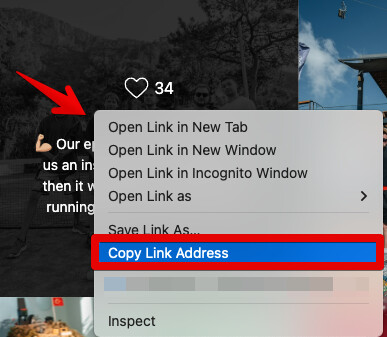
Locate the deleted post in your widget feed.
-
Right-click the post and select “Copy link address”:
-
Paste the link into the Filters section of the widget editor to hide it:

Let me know if a temporary solution worked for you, and stay tuned for the news 
Hey @Ori_Studio,
I just heard back from the dev team, and they let me know that they went through your widgets and, unfortunately, couldn’t find the deleted posts you’re referring to. Could you please help me out with that and provide:
- the name or an ID of the widget in question: Where to get your widget ID,
- screenshots or links to the posts that need to be removed.
It would really help us out 