It seems bizarre that there is no options for font size or customer width/height. These are just basic features that it should absolutely have!
I have a huge amount of modification on my Elfsight Countdown Timer because it has a CSS panel where you can add modifications. I must admit I got help from @Max here in the forum. I usually know how to add the things I want, but struggle to find the correct sector to address the element I want to change. But if you ask for it, there is a good chance you get the help you want, or you can of course use the button for customer support on your Elfsight dashboard.

Hi there, @user20504 
I see that you’ve already had a chat with my colleague Mike, and he provided you with this CSS code:
.eapps-countdown-timer-inner > div {
  zoom: 1.3;
}
However, we agree that it would be great to have this option right in the settings. If this request gains more votes, we’ll try to consider it in the future 
Hey everyone!
We’re happy to share that now you can change the font size right in the settings:

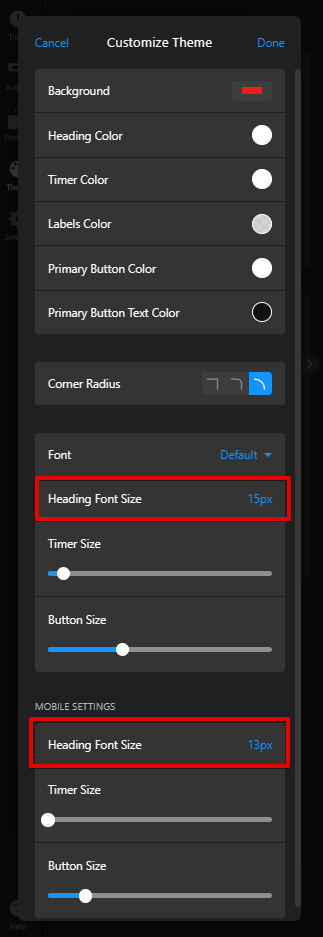
Currently, this feature is available only in the widgets created after this release. However, the good news is that we can manually update your existing widgets on our end 
Check this post for more details - Countdown Timer: [MAJOR UPDATE] Auto-repeat option, layout enhancements, new buttons, themes and more! 
2 Likes