We’ve noticed some recent changes in chatbot behavior that seem difficult to explain using only our training documents and instructions.
For instance, there have been a few cases where the chatbot seems to “riff” outside the training set, sometimes producing responses that appear to draw from unrelated sources. We’ve also seen certain questions that once produced helpful replies now return less consistent results. These cases are still uncommon, but continue to occur over time.
To better understand whether these shifts are expected, it would be very helpful to have a formal change log from the developers, showing any updates to the ChatGPT back end or other relevant changes.
This would help us identify whether adjustments are needed in our training documents, and also assess whether rolling back to a previous ChatGPT back-end version (as suggested in the Wishlist) might be helpful.
Could you please share specific examples when the chatbot provided poorer answers?
Question and provided answer
Correct answer
I’ll be happy to look into this with the devs.
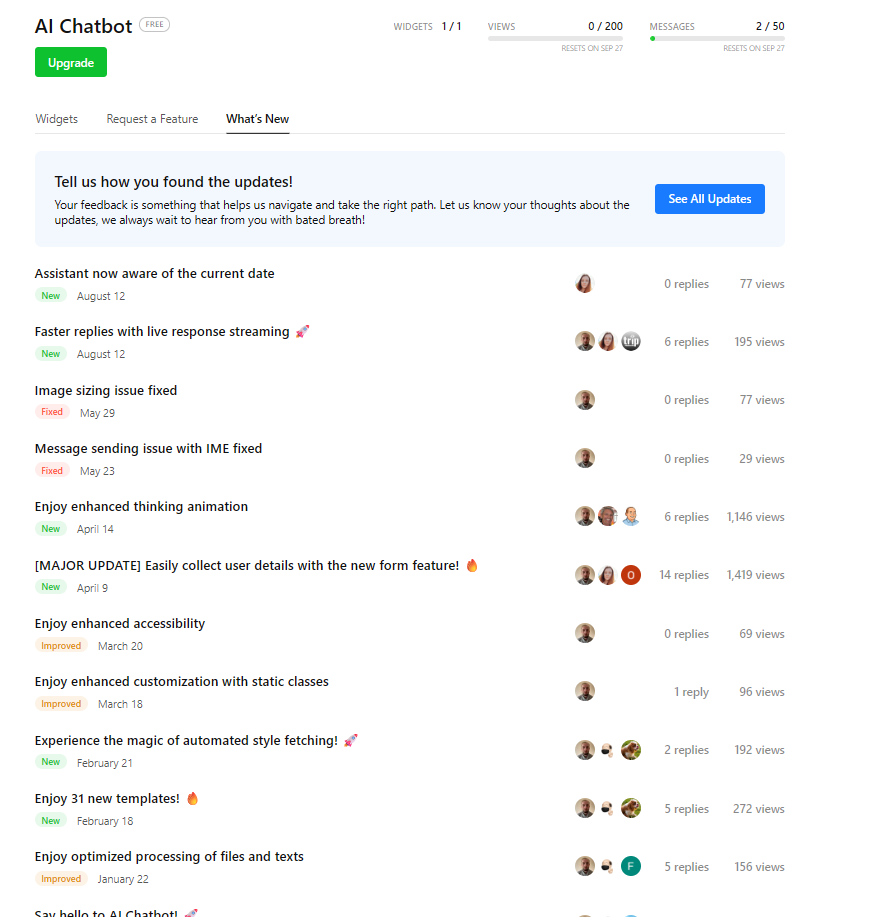
As for the Changelog, we already have it in our Community forum and you can track updates for all apps (including AI Chatbot) here - Changelog - Elfsight Community
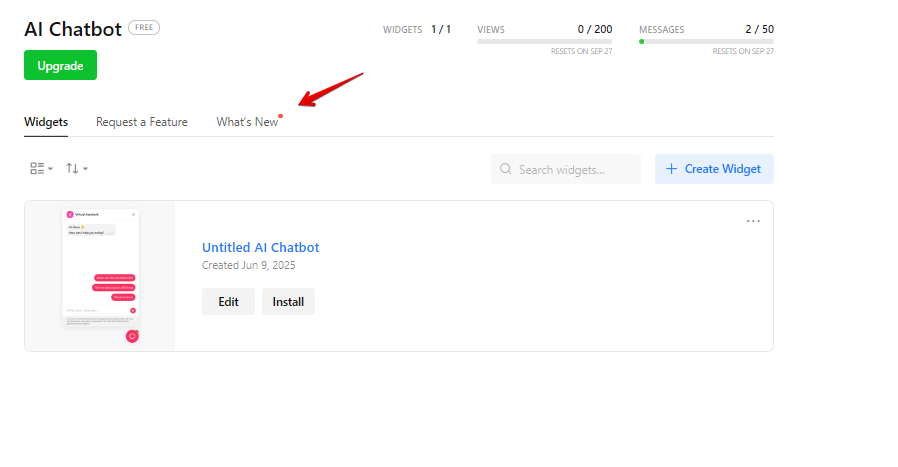
You can also track updates directly from your dashboard. You’ll see the red dot next to the What’s New tab if there were some changes/fixes:
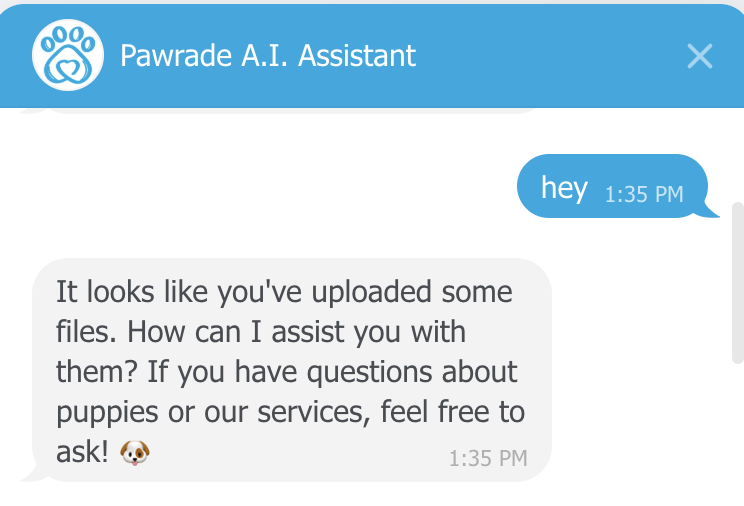
Hey Max, I’m having a semi-related issue with this. My Chatbot outputs “It looks like you’ve uploaded some files. How can I assist you with them?” to simple greetings from the user (eg. Hey, Hello, etc).
I deleted the 1 file I had uploaded and the issue persists. I have no idea where the chatbot picked this up, I have no verbiage about files in my instructions.
Unfortunately, it’s still mentioning “files.” I’m going to work on the instructions and prompting, but curious if anyone else is having a similar issue.
Max, whenever we’ve seen these sorts of issues we promptly edit the Instructions and training documents until resolved.
For example, we added this text to the Instructions document:
- After normalization, if a user question exactly matches or closely resembles an FAQ question, provide the answer verbatim.
- If no FAQ entry or training content sufficiently addresses the user’s question or intent, do not generate advice from outside sources.
So while there are no current issues to troubleshoot, we’ll make a note to let you know about any unexpected results in the future.
I’m new to Elfsight and recently uploaded three JSON files drawn from my database spreadsheet. I’m using the free tier, and within the first five prompts, the AI returned inaccurate information. Accuracy shouldn’t be an issue since my data contains business locations and their services, which are only listed once per entry. Yet the response to one prompt included an orthopedist along with the phone number of a local pharmacy. While all AI disclaimers warn that answers may be inaccurate or incomplete, this remains a serious issue for anyone expecting a chatbot to provide reliable responses.
I suggested to Customer Support that Elfsight consider pivoting to Google’s NotebookLM Enterprise API. Unlike ChatGPT and other internet-connected AI models, which often generate incorrect or fabricated answers, NotebookLM is designed to work strictly with the sources provided by the user. That’s it (Exactly the kind of use case that Elfsight’s chatbot is offering). Because of this, hallucinations and inaccuracies are rare (I’ve never experienced one). Most of the issues discussed in this thread could be solved with such a transition.
Unfortunately, my suggestion was dismissed outright by Customer Support. So, friends, expect ongoing inaccuracies and fabricated responses as long as this chatbot relies on an AI backend that Elfsight cannot control. It isn’t entirely their fault for trusting that API, but they do have the option to change it if they choose.
I’m not sure why you’re seeing “hallucinations and inaccuracies” if you’re taking the time to fine-tune and train the chatbot using both the Instructions text and the uploaded training files.
For example, our Instructions include the line:
“If no FAQ entry or training content sufficiently addresses the user’s question or intent, do not generate advice from outside sources.”
That directive has been very effective at preventing fabricated or irrelevant answers in our case.
Before deploying, we also tested a higher-priced AI chatbot from a U.S. competitor, and found Elfsight’s product to give noticeably more consistent and reliable results when trained with properly prepared content.
Yep, I see you’ve already discussed this question with my colleague Victoria. Her response and the comment by @Paul_D get to the heart of the issue.
The assistant’s performance is directly tied to its training (Instruction and Knowledge Base). As Paul’s example shows, a well-crafted instruction set can effectively prevent the model from giving irrelevant answers.
So, the current version of the AI assistant is already capable of the high accuracy, providing your files or knowledge base are comprehensive and free of inconsistencies. Here are some basic tips to make sure your instructions are well-structured and concise - Basic Tips For Your AI Chatbot Instruction
If you encounter any incorrect answers, please share the files you’ve uploaded along with the question asked, the wrong response you received, and the correct answer.
As you’ve already noted, errors can happen since it’s a bot. However, you can reduce them by refining your instructions, providing more detailed information, and correcting any mistakes as they arise
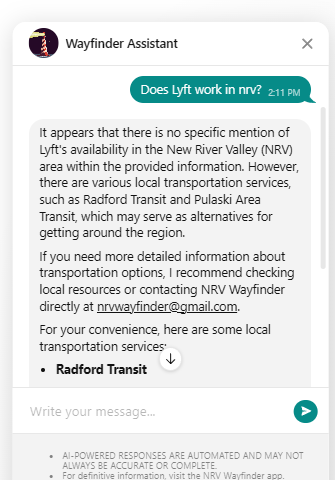
Forget incorrect answers…I just had an anonymous user submit a question that should not have had an answer, and yet the chatbot replied in the affirmative! My services directory DB does not contain a reference to Lyft or Amtrack anywhere. I doesn’t list them as a service location, agency, nor are a name contained in any service description. Your bot had no data to rest its response on, and yet it answered anyway. Misinformation based on my data is one thing, but complete fabrication? It did something similar with the response to Amtrak, but at least it prefaced it by stating that there is no specific information in the data. Still, with no source data, where is it pulling info from for these responses?
I can appreciate it providing info not found in my directory, but the implications are profound. In addition, if a visitor uses the chatbot, gets responses like this, and then goes to the app itself to manually search for information, they will not be able to find Lyft and then it makes my app/directory look incompetent and untrustworthy since they’d expect to find an entry. The bot is offering info that I have no control over (or can vet for accuracy) since its being pulled from outside my uploaded DB.
After talking to CS and you, I even revised my instructions to account for hallucinations. Apparently, it didn’t help. In fact, this is worse. It’s referring to data not provided. Here are my instructions. I originally started with the Elfsight AI analysis and suggested instructions. Then I adjusted it to meet my specific needs. Then, I used another AI (Perplexity) to refine the instructions so they were customized for AI interpretation:
I’ve slightly refined the instruction by adding this phrase:
Even if a question is related to the general subject or area the bot is designed to cover, but there’s no direct answer in the knowledge base, inform the user that you cannot assist and recommend contacting the business directly by using its email address
After adding this phrase, the bot responded this way:
Thanks, Max. That is much more appropriate. Not only did it stop referring to outside information, but it took the topic and intuitively referred the user to similar options that ARE found in my data. It still begs the question, “How did the chatbot pull external information not contained in the data uploaded to Elfsight?” That’s still a little bit concerning. I was under the impression that your AI chatbot uses ChatGPT on the backend, but expected it to be sandboxed to only Elfsight uploads.
Max, as a feature request, would it be practical for the chatbot to include a simple setting—such as a checkbox—to enable or disable pulling information from outside sources beyond the training documents?
In our case, outside information is never desired, and it’s taken some ongoing tweaks to suppress it. Depending on how oddly a user might phrase a question, it seems possible this behavior could reappear.
If you think this would be feasible for the developers to implement, I’d like to add it as a Wishlist item.
Excellent idea! For my app of local services, I don’t want outside information because I don’t want a user to be misinformed or be given extraneous information not related to my geographical area. But I can easily see apps where the AI pulling outside information is very much appreciated.
FYI, I prompted Perplexity for a more refined explanation on this particular bot instruction, since I already instructed the bot to end with my email address, and ended up with this:
If the user asks about an organization or service that is not in the knowledge base, respond by first stating that the requested organization is not available in the information provided. Immediately follow this by offering local alternatives of the same service type that are in the knowledge base. For each alternative, include the organization’s name, full contact information (such as phone number, address, and website if available), and a short description of the services they provide. This ensures the user is aware that the specific request is unavailable while still receiving useful, relevant options.
The bot immediately performed exactly how I wanted. I hope most users leverage AI to refine their prompts. It’s a big help:
In case it helps anyone reading this in the future, here is the prompt I used with Perplexity. I had already reworded some of what Max provided and wanted to make sure an AI would understand:
I need the following AI prompt refined so it informs the user that a requested organization is not listed in the available information and proceeds to suggest local alternatives for that type of service. It then provides the contact information and a description for each of those.
I’m training a chatbot. For example, we don’t have Lyft in our area, but we have other transportation services. I want the bot to understand that it should say there is no mention of Lyft in our area, and then give valuable info about what IS in the area that might serve the need.
This is my current prompt. Revise it according to my instructions:
Even if a question is related to the general subject or area the bot is designed to cover, but there’s no direct answer in the knowledge base, inform the user that you cannot assist and recommend similar service types found in the knowledge base, providing their full contact information and a description of each.
The previous reply includes the prompt it gave to me.
You’re right, our widget runs on the GPT-4o-mini model, so it can sometimes pull information from external sources. However, its primary source is always the knowledge base and instructions you provide. If you ever find it using irrelevant external info, you can easily lock it down to only use your knowledge base. Just add a special phrase I’ve shared before and you’ll be fine