Is it possible to change size of the form? I mean make it wider
2 Likes
Hi there, @user28783 
Sure, you can change the width on the Layout tab of your widget’s settings:
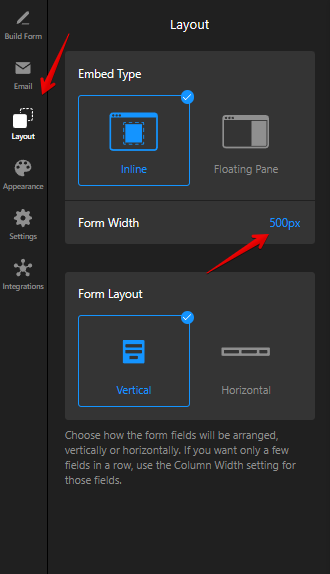
Let me know if it worked or if you have any further questions 
1 Like
yes, it worked
I have also a question about “redirect to URL”. I tested my form and link did not worked. Link is correct. Where can be a problem?
2 Likes
As I see, your widget is installed on Wix platform and the issue occurs because of the iframes used there.
To fix it, you should reinstall the widget avoiding iframes using one of the following methods:
-
Installing Elfsight widget on Wix avoiding iFrame via Custom Element - Elfsight Help Center
-
Installing Elfsight widget on Wix avoiding iFrame via Custom Code - Elfsight Help Center
If you face difficulties, feel free to request the installation in your dashboard. Don’t forget to mention that the widget should be installed avoiding iframes and our Support Team will gladly assist you with it
1 Like
I did everything as it was written in the first instruction, but now my widget is invisible. Where can be a problem?

1 Like
Hi @user28783
Apologies for the confusion!
With this way of installation, the widget isn’t visible in the backend, but it should appear on your website after publishing changes. Please try it out and let me know if it worked
I tried one more time. It did not work and it is still invisible
1 Like
Got it!
It’s hard to say exactly went wrong, but our Support Team will gladly assist you with the installation. Please request it in your dashboard and our support agent will reach out to you as soon as possible