-
Issue description: I’d like to import a clickable button from Google Calendar. Is that possible? And if so, how? Thank you for your help.
-
Link to the page with the widget in question: Book Your Appointment
Greetings and welcome to the Community, @Atelier_des_Bricoleu 
You’re referring to the Event Calendar widget, right? If so, currently it’s impossible to import the button to events from the Google Calendar, but this idea is already on the Wishlist. Feel free to upvote here - Add button for EC connected to Google Calendar.
However, there is one workaround. You can add a clickable text for the button in the event description in your Google Calendar:

After that, please check ** Description** in the Event Elements section on the Layout tab:

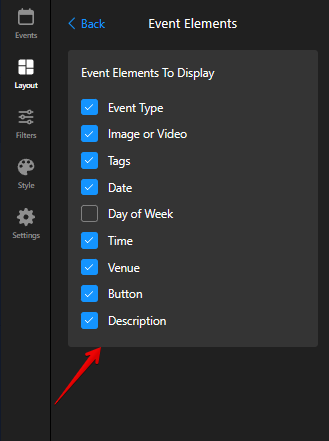
Finally, paste this code to the Custom CSS field on the Style tab of your widget’s settings:
.global-styles, a {
display: inline-block;
font-size: 12px;
font-weight: bold;
color: white;
background-color: purple;
padding: 10px 20px;
border: 0px solid purple;
border-radius: 20px;
text-align: center;
text-decoration: none;
cursor: pointer;
text-wrap: auto;
overflow-wrap: anywhere;
}

.global-styles,
a:hover,
a:focus {
color: white !important;
}
This solution isn’t perfect (especially for long descriptions) and the code might need some adjustment, since it can work differently depending on the website. However, this is the only option for now.
Give it a try and let me know if it worked for you 