To add carousel scrolling text to Announcement Bar, like this.

#1.1. First you need to enable Announcement Bar
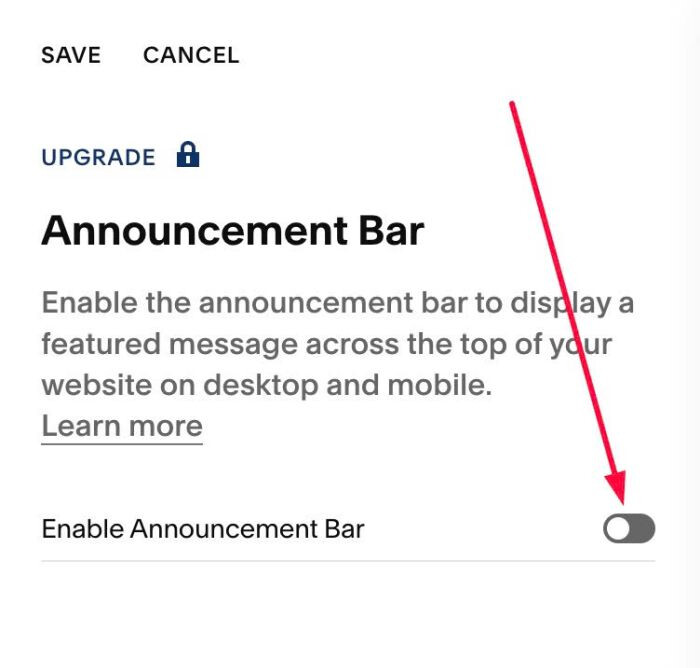
#1.2. Next, add some Paragraph to Announcement Bar

#1.3. Next, use this code to Code Injection > Footer
<!-- 07.26c01v10 Carousel Scrolling Announcement Bar -->
<script>
window.AnnouncementCarouselConfig = {
  effect: 'slide',
  transitionSpeed: 500,
  arrows: true,
  autoplay: true,
  autoplayDelay: 3000,
  pauseOnHover: true,
  keyboard: true,
  trackpad: true,
  drag: true
};
</script>
<script src="https://code.beaverhero.com/header/0726c01v10carouselannouncementbar.js"></script>

#2.1. Carousel items every 3000 (3 seconds), you can change this time in Line 08
autoplayDelay: 3000,
#2.2. To disable left/right arrows, change Line 06
arrows: true,
to
arrows: false,
#2.3. To change effect from Slide to Fade, you can change Line 04
effect: 'slide',
to
effect: 'fade',
#2.4. To remove close X icon on top right, you can use this under main code
<style>
  span.sqs-announcement-bar-close {
    display: none !important;
}
</style>
