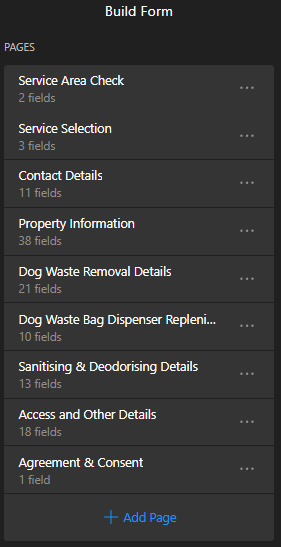
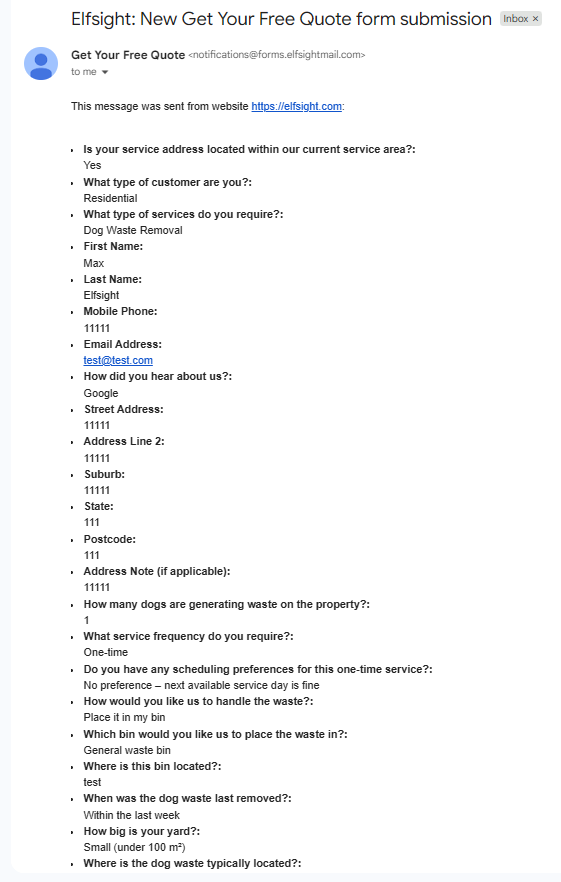
I’m wondering if it’s possible to improve the form builder submission output. Currently, when the form is submitted, some fields show, whilst others (such as headings or paragraphs) don’t. Also, not all the fields are output in the order that they appear in the form, which is highly confusing. Also, there is no grouping or segregation of the outputs by pages. I’m wondering if the following is possible:
Have all fields (including headings and paragraphs) that are not hidden by conditional logic show on the output.
Have fields that are hidden on the form (by conditional logic) not show on the output.
Have all the fields ordered in the same way that they are in the form.
Have fields grouped/segregated by pages, with the title of each grouped/segregated page section shown on the output.
Possibly include a date/time stamp for when the form was submitted. Although, this is not so important as you already receive an email which is date/time stamped, but sometimes emails can be delayed.
I also discovered that some degree of customisation is possible in the ‘Notify Me’ settings. However, the form field value mail-tags are limited, and many of my form fields share identical Field IDs because they use the same Label. This adds complexity and may prevent me from customising the output in a suitable way.
Unfortunately, it’s impossible to include fields without IDs (like headings and paragraphs) in the submissions. I’ve added this idea to the Wishlist on your behalf and if it gets more votes, we’ll try to think it over in the future - Display fields without field IDs (paragraphs, headings) in submissions
Fields that are hidden with the conditional logic shouldn’t appear in the submissions. I’ve tested your widget and everything worked fine. If you still experience this issue, please send me a screenshot of the submission fields hidden with conditional logic
The form fields in the submissions keep the order set in the widget’s settings. I’ve tested your widget and the order is correct:
Since the submission is delivered to the email right after clicking the Submit button in the form, you can check the submission time right in the email:
Thank you for the detailed response and for adding those ideas to the Wishlist on my behalf. I appreciate you looking into the widget behaviour as well. I’ll keep monitoring it on my end.
The more recent form submission emails ive received have been sufficient for my business needs.