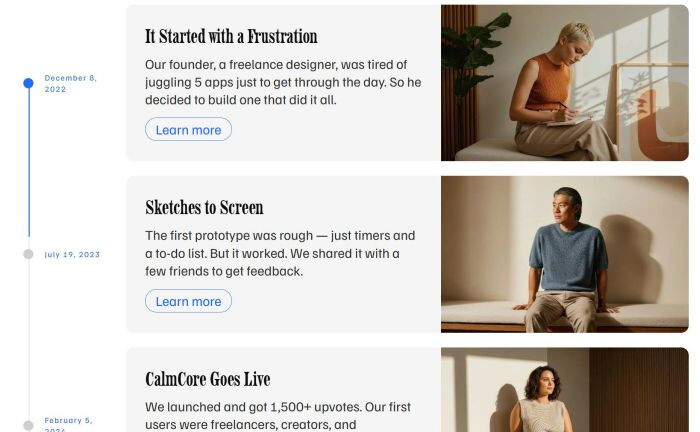
To add a Timeline on Squarespace with list on right, vertical line on left, like this.
- view demo - password: abc
#1. Install Code
#1.1. First, you need to add a Team Section (choose Team > choose section with (i) icon)

Make sure you choose Simple List

Enable these options

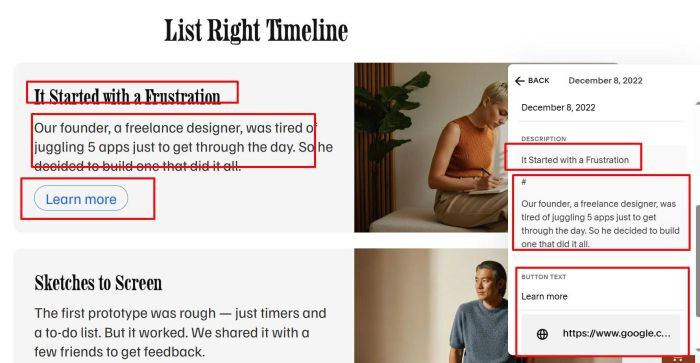
#1.2. at Content Tab, edit each item > enter your image, title, description, button
-
title = date
-
image = image

Use # symbol to make text above it to heading style
#1.3. Hover on top right of section > Click Edit Section

Enter word: timelinev1

#1.4. Hover on page where you use Team Section > Click Gear icon

Click Advanced > Paste this code
<!-- @tuanphan - Timelinev1 -->
<style>
section[id*="timelinev1"] .tp-timeline{
max-width:1200px;
margin:0 auto;
padding:40px 20px;
}
section[id*="timelinev1"] .tp-timeline__title{
text-align:center;
margin:0 0 26px;
}
section[id*="timelinev1"] .tp-timeline__list{
position:relative;
display:flex;
flex-direction:column;
gap:26px;
}
section[id*="timelinev1"] .tp-rail-global{
position:absolute;
left:29px;
top:var(--tp-rail-top,0px);
height:var(--tp-rail-h,0px);
width:2px;
background:#e8e8e8;
border-radius:2px;
z-index:0;
}
section[id*="timelinev1"] .tp-rail-global:after{
content:"";
position:absolute;
left:0;
top:0;
width:2px;
height:var(--tp-progress-h,0px);
background:#1f6cff;
border-radius:2px;
}
section[id*="timelinev1"] .tp-item{
display:grid;
grid-template-columns:180px 1fr;
gap:22px;
align-items:center;
}
section[id*="timelinev1"] .tp-rail{
position:relative;
display:flex;
align-items:center;
min-height:160px;
z-index:1;
}
section[id*="timelinev1"] .tp-dot{
position:absolute;
left:20px;
top:50%;
transform:translateY(-50%);
width:18px;
height:18px;
border-radius:999px;
background:#cfcfcf;
transition:background .25s ease;
}
section[id*="timelinev1"] .tp-dot.is-active{
background:#1f6cff;
}
section[id*="timelinev1"] .tp-meta{
margin-left:58px;
display:flex;
flex-direction:column;
gap:6px;
}
section[id*="timelinev1"] .tp-date {
    letter-spacing: .12em;
    color: #1f6cff;
    font-size: 14px;
    line-height: 20px;
}
section[id*="timelinev1"] .tp-card{
background:#f5f5f5;
border-radius:14px;
display:grid;
grid-template-columns:1fr 44%;
overflow:hidden;
}
section[id*="timelinev1"] .tp-card__body{
padding:36px 34px;
}
section[id*="timelinev1"] .tp-card__h{
margin:0 0 12px;
color:#0e0e0e;
}
section[id*="timelinev1"] .tp-card__p{
margin:0 0 18px;
color:#333;
max-width:58ch;
}
section[id*="timelinev1"] .tp-actions{
display:flex;
gap:12px;
flex-wrap:wrap;
}
section[id*="timelinev1"] .tp-btn{
display:inline-flex;
align-items:center;
justify-content:center;
height:40px;
padding:0 18px;
border-radius:999px;
text-decoration:none;
border:1px solid #1f6cff;
color:#1f6cff;
background:transparent;
}
section[id*="timelinev1"] .tp-card__media{
position:relative;
}
section[id*="timelinev1"] .tp-img{
position:absolute;
inset:0;
width:100%;
height:100%;
object-fit:cover;
}
section[id*="timelinev1"] .tp-hide-original{
display:none !important;
}
@media (max-width:980px){
section[id*="timelinev1"] .tp-timeline{
padding:28px 5px;
}
section[id*="timelinev1"] .tp-timeline__list{
gap:18px;
}
section[id*="timelinev1"] .tp-item{
grid-template-columns:minmax(86px,22vw) minmax(0,1fr);
gap:8px;
align-items:start;
}
section[id*="timelinev1"] .tp-rail{
min-height:92px;
align-items:flex-start;
padding-top:14px;
}
section[id*="timelinev1"] .tp-rail-global{
left:7px;
width:1px;
}
section[id*="timelinev1"] .tp-rail-global:after{
width:1px;
}
section[id*="timelinev1"] .tp-dot{
left:2px;
top:14px;
transform:none;
width:12px;
height:12px;
}
section[id*="timelinev1"] .tp-meta{
margin-left:16px;
max-width:108px;
}
section[id*="timelinev1"] .tp-date{
font-size:10px;
letter-spacing:.10em;
padding:3px 6px;
border-radius:999px;
background:rgba(255,255,255,.92);
white-space:normal;
word-break:normal;
overflow-wrap:normal;
}
section[id*="timelinev1"] .tp-card{
grid-template-columns:1fr;
transform:scale(.95);
transform-origin:left top;
}
section[id*="timelinev1"] .tp-card__media{
aspect-ratio:4/3;
position:relative;
}
section[id*="timelinev1"] .tp-card__body{
padding:18px 18px 22px;
}
section[id*="timelinev1"] .tp-card__h{
font-size:22px;
}
section[id*="timelinev1"] .tp-actions{
gap:10px;
}
section[id*="timelinev1"] .tp-btn{
width:100%;
height:44px;
}
}
</style>
<script>
!function(){function e(e){var t,n,r=e&&e.getAttribute("data-current-context");if(!r)return null;try{return JSON.parse(r)}catch(e){}try{return JSON.parse((t=r,(n=document.createElement("textarea")).innerHTML=String(t||""),n.value))}catch(e){}try{return JSON.parse(String(r).replace(/"/g,'"'))}catch(e){}return null}function t(e){var t=(e?[].slice.call(e.querySelectorAll("p")):[]).map((function(e){return(e.textContent||"").replace(/\s+/g," ").trim()})).filter(Boolean);if(!t.length)return{t:"",p:""};var n=t.findIndex((function(e){return"#"===e}));return n<0?{t:t[0]||"",p:t.slice(1).join(" ").trim()}:{t:t.slice(0,n).filter((function(e){return"#"!==e})).join(" ").trim(),p:t.slice(n+1).filter((function(e){return"#"!==e})).join(" ").trim()}}function n(){var n=document.querySelector('section[id*="timelinev1"]');if(n){var r=n.querySelector("ul.user-items-list-item-container");if(r){var i=n.querySelector(".list-section-title p"),a=(i?i.textContent:"").trim()||"Timeline",l=e(r),c=l&&l.userItems?l.userItems:null,o=[].slice.call(r.querySelectorAll("li.list-item"));!o.length&&c&&c.length&&(o=new Array(c.length).fill(null));var d=n.querySelector(".tp-timeline");d&&d.remove();var m=document.createElement("section");m.className="tp-timeline",m.id="tpTimeline";var s=document.createElement("h2");s.className="tp-timeline__title",s.textContent=a,m.appendChild(s);var u=document.createElement("div");u.className="tp-timeline__list",u.id="tpTimelineList";var p=document.createElement("div");p.className="tp-rail-global",p.id="tpRail",u.appendChild(p),o.forEach((function(e,n){var r="",i="",a="",l="#",o=!0,d="",m="";if(e){var s=e.querySelector(".list-item-content__title");r=(s?s.textContent:"").trim();var p=t(e.querySelector(".list-item-content__description"));d=p.t,m=p.p;var v=e.querySelector("img.list-image");i=(v&&(v.getAttribute("data-src")||v.getAttribute("src")||"")).trim();var h=e.querySelector("a.list-item-content__button, a.sqs-block-button-element");h&&(a=(h.textContent||"").trim(),l=(h.getAttribute("href")||"#").trim(),o="_blank"===h.getAttribute("target"))}if(c&&c[n]){var g=c[n];if(r||(r=String(g.title||"").trim()),!d&&!m&&g.description){var f=document.createElement("div");f.innerHTML=g.description;var y=t(f);d=y.t,m=y.p}a&&l||!g.button||(a=String(g.button.buttonText||"").trim()||a,l=String(g.button.buttonLink||"#").trim()||l,o=!!g.button.buttonNewWindow),!i&&g.image&&g.image.assetUrl&&(i=String(g.image.assetUrl||"").trim())}d||(d=r||"Item "+(n+1)),m||(m="");var C=document.createElement("article");C.className="tp-item";var S=document.createElement("div");S.className="tp-rail";var E=document.createElement("span");E.className="tp-dot",S.appendChild(E);var b=document.createElement("div");b.className="tp-meta";var N=document.createElement("div");N.className="tp-date",N.textContent=r,b.appendChild(N),S.appendChild(b);var _=document.createElement("div");_.className="tp-card";var x=document.createElement("div");x.className="tp-card__body";var q=document.createElement("h3");q.className="tp-card__h",q.textContent=d;var w=document.createElement("p");w.className="tp-card__p",w.textContent=m;var L=document.createElement("div");L.className="tp-actions";var A=document.createElement("a");A.className="tp-btn",A.textContent=a||"Learn more",A.href=l||"#",o&&(A.target="_blank",A.rel="noopener"),L.appendChild(A),x.appendChild(q),x.appendChild(w),x.appendChild(L);var M=document.createElement("div");M.className="tp-card__media";var T=document.createElement("img");T.className="tp-img",T.alt="",T.src=i||"",M.appendChild(T),_.appendChild(x),_.appendChild(M),C.appendChild(S),C.appendChild(_),u.appendChild(C)})),m.appendChild(u);var v=n.querySelector(".user-items-list");v?v.appendChild(m):n.appendChild(m),r.classList.add("tp-hide-original");var h=n.querySelector(".list-section-title");h&&h.classList.add("tp-hide-original"),function(e){var t=e.querySelector("#tpTimelineList"),n=e.querySelector("#tpRail");if(!t||!n)return;var r=[].slice.call(t.querySelectorAll(".tp-dot"));if(!r.length)return;var i=0,a=0;function l(e,t,n){return e<t?t:e>n?n:e}function c(e){var t=e.getBoundingClientRect();return t.top+t.height/2}function o(){return window.matchMedia&&window.matchMedia("(max-width:980px)").matches}function d(e,r){var i=e-t.getBoundingClientRect().top,a=Math.max(0,r-e);return n.style.setProperty("--tp-rail-top",i+"px"),n.style.setProperty("--tp-rail-h",a+"px"),a}function m(e,t){return l((o()?.58*window.innerHeight:.55*window.innerHeight)-e,0,t)}function s(e,t,n){for(var i=0;i<r.length;i++){var a=l(c(r[i])-e,0,t);r[i].classList.toggle("is-active",a<=n+.5)}}function u(){i=0;var e=c(r[0]),t=d(e,c(r[r.length-1])),l=m(e,t);a+=.12*(l-a),Math.abs(l-a)<.35&&(a=l),n.style.setProperty("--tp-progress-h",a+"px"),s(e,t,a),Math.abs(l-a)>=.35&&p()}function p(){i||(i=requestAnimationFrame(u))}window.addEventListener("scroll",p,{passive:!0}),window.addEventListener("resize",(function(){a=0,p()})),document.fonts&&document.fonts.ready&&document.fonts.ready.then(p).catch((function(){}));p()}(m)}}}function r(){n()}"loading"===document.readyState?document.addEventListener("DOMContentLoaded",r):r(),document.addEventListener("mercury:load",r)}();
</script>

If you don’t want to use complex code, you can use Timeline tool (Free).
You can adjust text, button, image easier

and choose a lot of layout.

#2. Customize
#2.1. To change Date Style, find these lines (Line 80 to Line 85)
section[id*="timelinev1"] .tp-date {
letter-spacing: .12em;
color: #1f6cff;
font-size: 14px;
line-height: 20px;
}
#2.2. To change heading style, find these lines
section[id*="timelinev1"] .tp-card__h {
    margin: 0 0 12px;
    color: #0e0e0e;
}
#2.3. To change Description style, find these lines
section[id*="timelinev1"] .tp-card__p {
    margin: 0 0 18px;
    color: #333;
    max-width: 58ch;
}
#2.4. To change button style, find lines
section[id*="timelinev1"] .tp-btn {
    display: inline-flex;
    align-items: center;
    justify-content: center;
    height: 40px;
    padding: 0 18px;
    border-radius: 999px;
    text-decoration: none;
    border: 1px solid #1f6cff;
    color: #1f6cff;
    background: transparent;
}
#2.5. To change card background color behind text, card size, find lines
section[id*="timelinev1"] .tp-card {
    background: #f5f5f5;
    border-radius: 14px;
    display: grid;
    grid-template-columns: 1fr 44%;
    overflow: hidden;
}
#2.6. To change blue dots color, find
section[id*="timelinev1"] .tp-dot.is-active {
    background: #1f6cff;
}
#2.7. To change vertical line color, width, find lines
section[id*="timelinev1"] .tp-rail-global {
    position: absolute;
    left: 29px;
    top: var(--tp-rail-top, 0px);
    height: var(--tp-rail-h, 0px);
    width: 2px;
    background: #e8e8e8;
    border-radius: 2px;
    z-index: 0;
}