To add custom text under Product Title in Summary Block, like this.
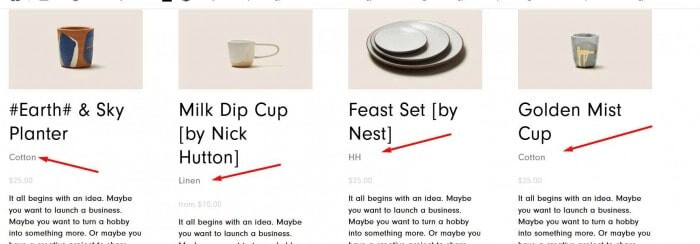
#1. First, edit each product > Click on EDIT in SEO and URL

#2. Enter custom text in SEO Description, like this

or this.

#3. Next, use this code to Code Injection > Footer
<script>document.addEventListener('DOMContentLoaded',function(){document.querySelectorAll('.summary-item').forEach(item=>{const titleLink=item.querySelector('.summary-title-link');const summaryTitle=item.querySelector('.summary-title');if(titleLink&&summaryTitle){const href=titleLink.getAttribute('href');if(href){fetch(href+'?format=json-pretty').then(response=>response.json()).then(data=>{const seoDescription=data.item?.seoData?.seoDescription;if(seoDescription){const seoDiv=document.createElement('div');seoDiv.className='summary-subline';seoDiv.textContent=seoDescription;summaryTitle.insertAdjacentElement('afterend',seoDiv)}}).catch(error=>console.log('Cannot get data:',href))}}})});</script>
<style>
.summary-subline {
    color: grey;
    font-size: 16px;
}
</style>

#4. You can change custom text color/size here
