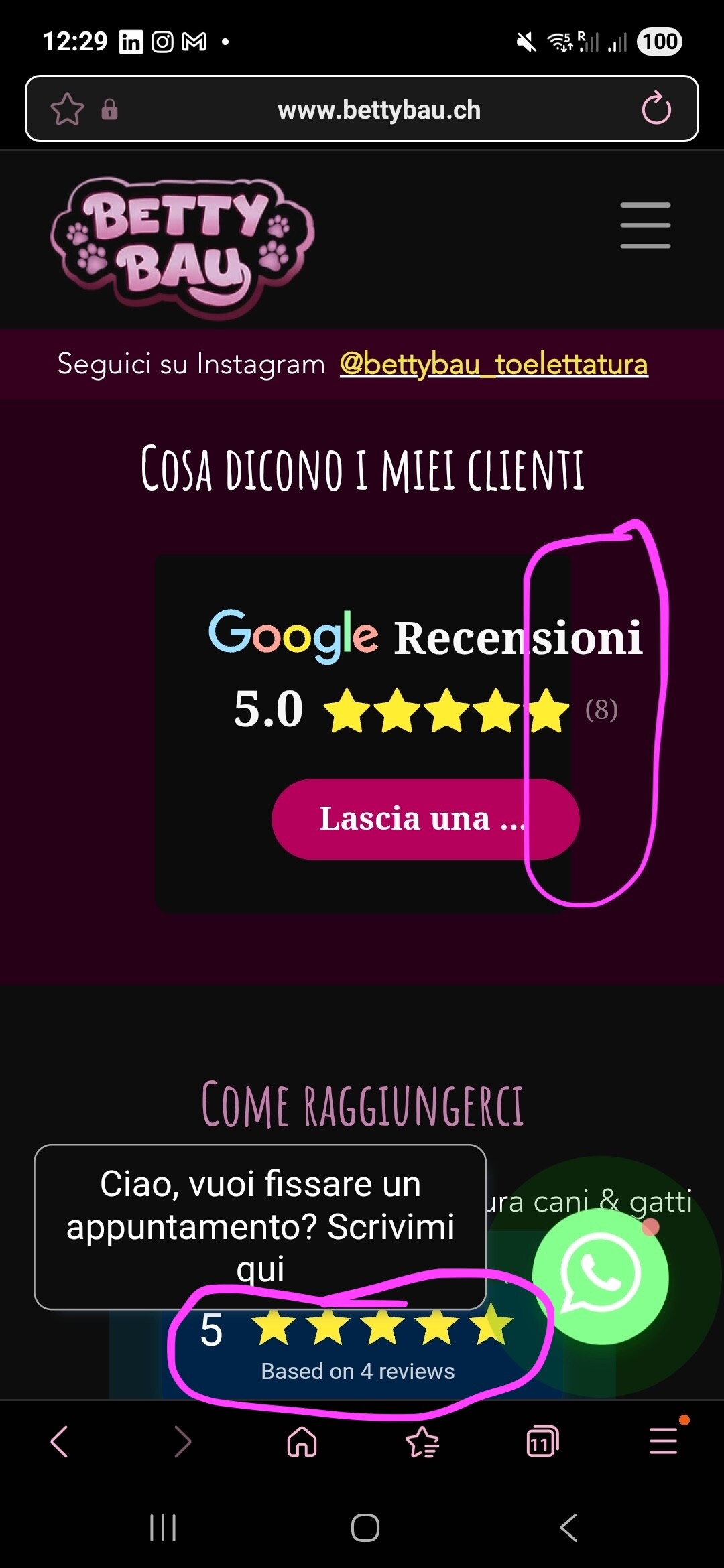
Google Review mobile optimisation not working

Hello everyone,

I am fairly new to elfsight and already have a question :sweat_smile:

The Google Review widget works great on my clients desktop version of my website but doesn’t look so great on the mobile, can anyone help?

I have two issues on the mobile version:

  1. There is a floating review badge that stays even when scrolling. When clicking on it, it shows some random review, I’ve no idea from where they come (I can only add one embeded media apparently as new user).

  2. The header wording “Google Review” is bigger than its container.

This is the website with the widget: https://bettybau.ch

Thank you very much in advance for your help!

Wishing everyone a lovely Sunday, Linda

Hi @Linda_Belvedere! I’m happy to see you in the Community :smiling_face:

I’ll be glad to help you with the issues you’re experiencing.

Speaking of the first question – I just checked your website, and I can confidently say that the floating review badge is not ours. Judging by the developer console, it seems to be a default one from your CMS.

If you want to get rid of it, please check the website editor once more – it’s probably installed as a floating block somewhere :folded_hands:

As for the second point, I already forwarded it to the devs. They will come back to me with the CSS code that’ll fix everything for you – I’ll keep you posted :raising_hands:

Hi there, Linda :waving_hand:

I just heard back from the devs, and they provided this CSS code to fix the layout:

.es-widget-background-wrapper {
  padding: 20px !important;
}

.global-styles,
body:has(> .elfsight-app-87ec5052-823c-4e68-ab3b-979e7ff59fe9) {
  margin: 0;
}

.es-main-container {
  height: auto;
}

already added this code into the Style → Custom CSS section of your widget, so you can check out your website to see how it looks on your end :smiling_face:

But the main thing that causes the issue is that the widget is installed in an iframe. To fix it properly, you’ll might want to do one of these:

  1. Stretch the iframe container in the editor to fit our widget.

  2. Embed the widget without an iframe, which works better for mobile. You can use our guide for this: Installing Elfsight widget on Wix avoiding iFrame via Custom Element.

If you need help with this, just let me know! I’m happy to assist.

1 Like

Hello @Irene

Thank you so much, it looks perfect now!

Have a lovely start into the new week :slight_smile:

3 Likes