-
I am a new user of the Event Calendar widgets. It seems if I use the button, the button will appear in two places, on the Event page and in the description of the event. Is there a way to have only the button in the description only?
-
Link to the page with the widget in question:
Hi @Kamala_Ishaya welcome to community 
witch Layout do you use? Would you share the Widget-Link?
Add this code to the Custom CSS field on the Style tab of your Event Calendar widget’s settings:
This Code ist for the Grid Layout
.eapp-events-calendar-grid-item-button {
  display:none;
}
This Code ist for the Masonry Layout
.eapp-events-calendar-masonry-item-button{
  display:none;
}
Hello Sina. Thank you for your reply! I use the Upcoming Webinar Layout. The Widget link is https://466fbb62840e4eeeb899ebddfafadd4b.elf.site
Hi @Kamala_Ishaya
Thanks for sharing. Now I can judge it better.
The template you are using has a grid layout by default.


You don’t want to have the button in the event overview, then use this code
.eapp-events-calendar-grid-item-button {
  display:none;
}
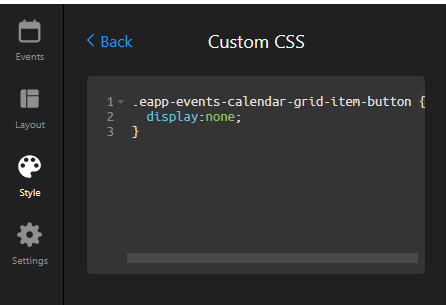
This is the result.

Please try it out and let me know if you like the result !
Hi there, @Kamala_Ishaya 
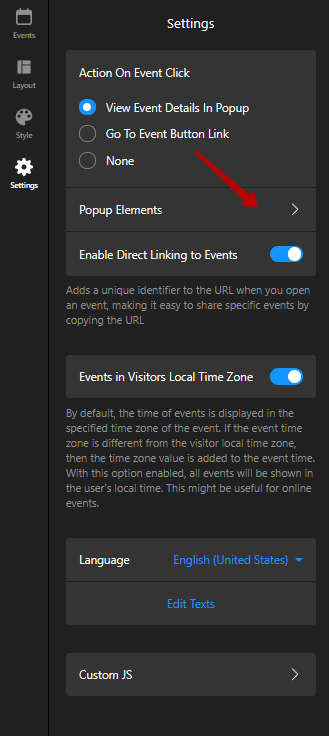
If you want to hide the button in the popup, we have a setting for this in the Popup Elements on the Settings tab 

Hello Sina, Thank you! It works and it looks good..
Thank you, Max!
You’re always welcome 
Thank the support team’s help! I really appreciate it.