To add a Youtube Gallery to Squarespace, like this.

#1. First, adding a Gallery Grid Section
First, click Add a Section > Choose Images > Choose Section with (i) icon.

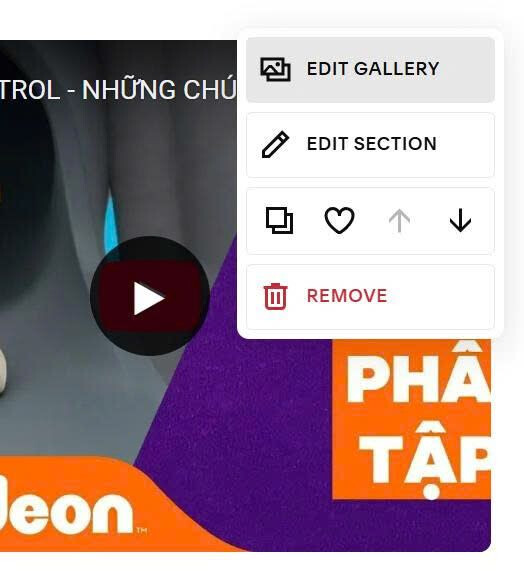
Next, hover on top right > Click Edit Section
Choose Simple Grid + you can set number of columns

#2. Next, find ID of Gallery Image section

#3. Next, use this code to Custom CSS
You can also use Youtube Feed free widget, so you can add Youtube Gallery easier with more style without using complex code.
section[data-section-id="68eca7bfa6ad7d1cf0a051d5"] {
  .gallery-grid-item {
  position: relative;
}
.gallery-grid-item-wrapper {
  position: relative;
}
.video-container {
  position: relative;
  width: 100%;
  padding-bottom: 75%;
  background: #000;
  border-radius: 8px;
  overflow: hidden;
}
.youtube-iframe {
  position: absolute;
  top: 0;
  left: 0;
  width: 100%;
  height: 100%;
  border: none;
}
.play-button {
  position: absolute;
  top: 50%;
  left: 50%;
  transform: translate(-50%, -50%);
  background: rgba(0, 0, 0, 0.8);
  color: #fff;
  border: none;
  border-radius: 50%;
  width: 80px;
  height: 80px;
  font-size: 28px;
  cursor: pointer;
  z-index: 10;
  display: flex;
  align-items: center;
  justify-content: center;
  transition: all 0.3s ease;
}
.play-button:hover {
  background: rgba(0, 0, 0, 0.9);
  transform: translate(-50%, -50%) scale(1.1);
}
.gallery-grid-image-link img {
  display: none !important;
}}

#4. Next, use this code to Page Header Injection (page where you use Gallery Grid)
<script>
const youtubeLinks = [
  'https://www.youtube.com/watch?v=uIWD6JsPyjw',
  'https://www.youtube.com/watch?v=cGzk_LesLJY',
  'https://www.youtube.com/watch?v=usE6krJj99M',
  'https://www.youtube.com/watch?v=-Q6x9XPooeM'
];

(function() {
  let currentPlayingVideo = null;
  let videoPlayers = [];
  let initialized = false;
  let ytReady = false;

  window.onYouTubeIframeAPIReady = function() {
    ytReady = true;
    initializeVideoCarousel();
  };

  function loadYouTubeAPI() {
    if (window.YT && window.YT.Player) {
      ytReady = true;
      return;
    }
    const tag = document.createElement('script');
    tag.src = 'https://www.youtube.com/iframe_api';
    const firstScriptTag = document.getElementsByTagName('script')[0];
    firstScriptTag.parentNode.insertBefore(tag, firstScriptTag);
  }

  function extractYouTubeId(url) {
    const patterns = [
      /(?:youtube\.com\/watch\?v=|youtu\.be\/)([^&\?\/]+)/,
      /youtube\.com\/embed\/([^&\?\/]+)/,
      /youtube\.com\/v\/([^&\?\/]+)/
    ];
    for (let pattern of patterns) {
      const match = url.match(pattern);
      if (match) return match[1];
    }
    return null;
  }

  function createYouTubePlayer(container, youtubeId) {
    if (!window.YT || !window.YT.Player) {
      return null;
    }
    return new window.YT.Player(container, {
      videoId: youtubeId,
      playerVars: {
        autoplay: 0,
        controls: 1,
        rel: 0,
        modestbranding: 1,
        playsinline: 1
      },
      events: {
        onStateChange: onPlayerStateChange
      }
    });
  }

  function onPlayerStateChange(event) {
    const playerData = videoPlayers.find(p => p && p.player === event.target);
    if (!playerData) return;

    if (event.data === YT.PlayerState.PLAYING) {
      playerData.isPlaying = true;
      playerData.playButton.style.display = 'none';
      currentPlayingVideo = playerData;
    } else if (event.data === YT.PlayerState.PAUSED || event.data === YT.PlayerState.ENDED) {
      playerData.isPlaying = false;
      playerData.playButton.innerHTML = '▶';
      playerData.playButton.style.display = 'flex';
      playerData.playButton.classList.remove('playing');
    }
  }

  function createPlayButton() {
    const button = document.createElement('button');
    button.className = 'play-button';
    button.innerHTML = '▶';
    return button;
  }

  function setupVideoPlayer(galleryItem, youtubeUrl, videoIndex) {
    const youtubeId = extractYouTubeId(youtubeUrl);
    if (!youtubeId) return;

    const wrapper = galleryItem.querySelector('.gallery-grid-item-wrapper');
    if (!wrapper) return;

    const videoContainer = document.createElement('div');
    videoContainer.className = 'video-container';
    videoContainer.setAttribute('data-video-index', videoIndex);

    const iframeContainer = document.createElement('div');
    iframeContainer.className = 'youtube-iframe';
    iframeContainer.id = 'youtube-player-' + videoIndex;

    const playButton = createPlayButton();

    videoContainer.appendChild(iframeContainer);
    videoContainer.appendChild(playButton);

    wrapper.innerHTML = '';
    wrapper.appendChild(videoContainer);

    const player = createYouTubePlayer(iframeContainer.id, youtubeId);

    const playerData = {
      player: player,
      playButton: playButton,
      container: videoContainer,
      videoIndex: videoIndex,
      youtubeId: youtubeId,
      isPlaying: false
    };

    videoPlayers[videoIndex] = playerData;

    playButton.addEventListener('click', function(e) {
      e.preventDefault();
      e.stopPropagation();

      if (currentPlayingVideo && currentPlayingVideo !== playerData) {
        pauseVideo(currentPlayingVideo);
      }

      if (playerData.isPlaying) {
        pauseVideo(playerData);
      } else {
        playVideo(playerData);
      }
    });
  }

  function playVideo(playerData) {
    if (playerData.player && playerData.player.playVideo) {
      playerData.playButton.style.display = 'none';
      playerData.player.playVideo();
    }
  }

  function pauseVideo(playerData) {
    if (playerData.player && playerData.player.pauseVideo) {
      playerData.player.pauseVideo();
    }
  }

  function initializeVideoCarousel() {
    if (initialized || !ytReady) return;

    const targetSection = document.querySelector('section[data-section-id="68eca7bfa6ad7d1cf0a051d5"]');
    if (!targetSection) return;

    const galleryItems = targetSection.querySelectorAll('.gallery-grid-item');
    if (galleryItems.length === 0) return;

    galleryItems.forEach((item, index) => {
      if (index < youtubeLinks.length) {
        setupVideoPlayer(item, youtubeLinks[index], index);
      }
    });

    initialized = true;
  }

  function checkAndInit() {
    const items = document.querySelectorAll('.gallery-grid-item');
    if (items.length > 0 && !initialized && ytReady) {
      initializeVideoCarousel();
    }
  }

  loadYouTubeAPI();

  if (document.readyState === 'loading') {
    document.addEventListener('DOMContentLoaded', function() {
      setTimeout(checkAndInit, 500);
    });
  } else {
    setTimeout(checkAndInit, 500);
  }

  setInterval(checkAndInit, 2000);
})();
</script>

Remember to update Youtube URL in the code

and update Gallery Grid ID.
