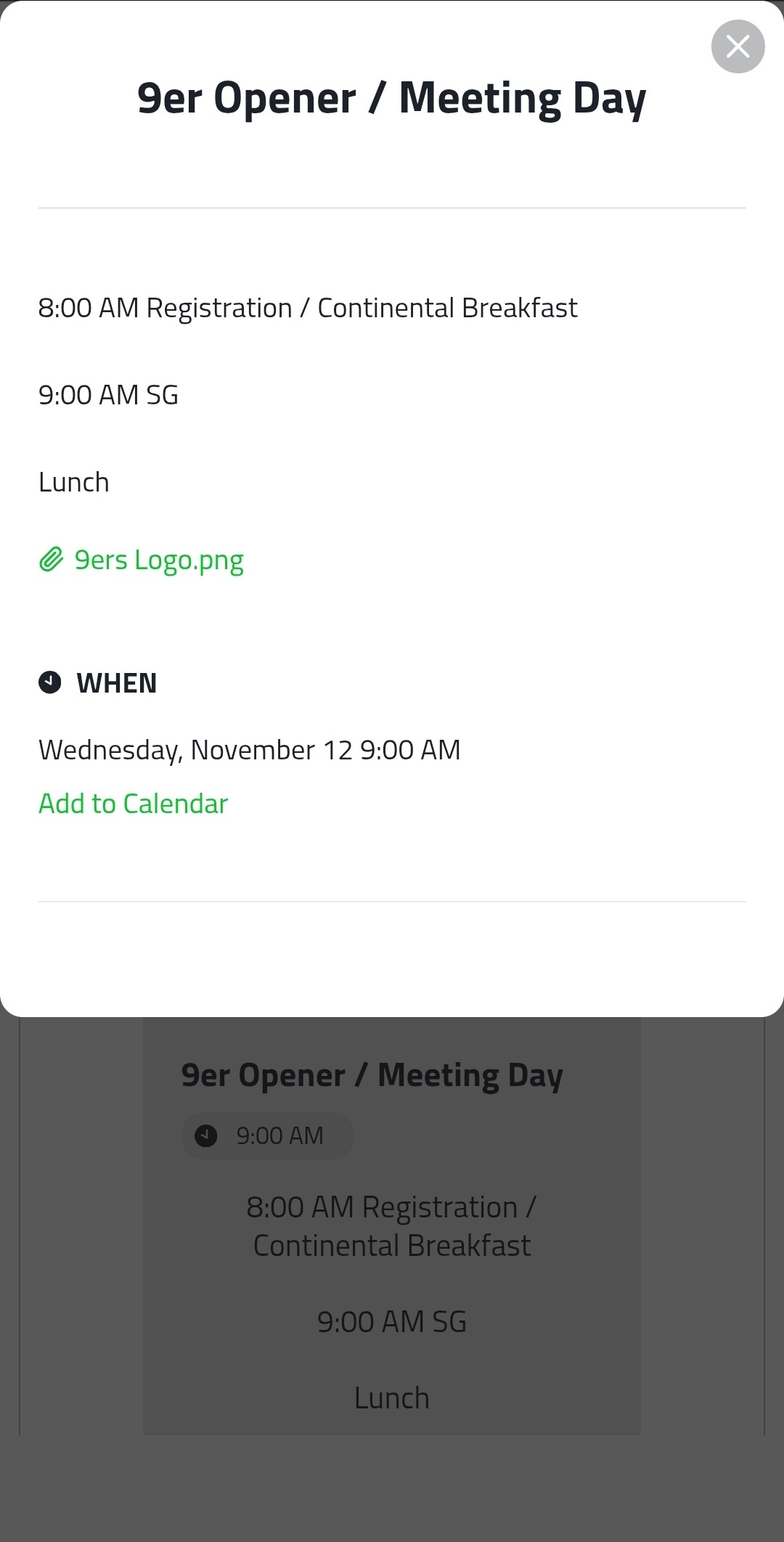
The first question goes with this screenshots of our Events Calendar. So, as you can see we have an attachment on Nov. 12th.. You can only see that there is an attachment in the popup view. Is there any way or a code that would make it show there’s an attachment in the regular view of the event calendar? (As you see in the second screen shot).
Part 2 of this question: Is there a way or a code that aligns all the text on the Events Calendar to line up on the left side like you see in the popup view?
Question 2: In PDF Embed (See screenshot below). Is there a code to make the title centered on the page? If not, I’ll just type it in with our website editor. Then, is there a code to make the text and icon of each PDF bar bigger? And, is there a code that would allow us to open the attachment on the same page, vs. it opening into another page when you click on the word Download?
Hi! One more question! We paid for one individual month of the Events Calendar, then went ahead a few days later and purchased the 98+ Apps. Will the Events Calendar we created carry over into the 98+ Apps? Or will we have to create the calendar again? I went ahead and canceled the individual plan. It will end Oct. 10th.
Long time no see! Happy to see you back again, @Sydney_Jones
At the moment, unfortunately, attached files can be displayed in the popup only. However, I agree that it would be nice to show them in the event cards too. I’ve added this idea to the Wishlist on your behalf - Display attachments in the event cards
The event elements are aligned to the left by default in the event cards. Could you please send me a link to the page with the widget from your 2nd screenshot, or just specify its ID?
CSS code to align the PDF Embed title to the center:
Amazing!.. absolutely amazing!! Thank you so so much, as always Max and Team! Oh yes! Nice to see you all too! I’ll always be around as long as I’m creating websites. Elfsight is a MUST HAVE! Especially with it’s OUTSTANDING Team behind it!
Long time no see! Happy to see you back again, @Sydney_Jones
At the moment, unfortunately, attached files can be displayed in the popup only. However, I agree that it would be nice to show them in the event cards too. I’ve added this idea to the Wishlist on your behalf - Display attachments in the event cards
The event elements are aligned to the left by default in the event cards. Could you please send me a link to the page with the widget from your 2nd screenshot, or just specify its ID?
CSS code to align the PDF Embed title to the center:
Thanks so much for your kind words! It really inspires us to keep pushing forward
Would you mind if I make this conversation public? I think it could really help other users, and it would be wonderful to share your fantastic feedback with the Community
Thanks so much for your kind words! It really inspires us to keep pushing forward
Would you mind if I make this conversation public? I think it could really help other users, and it would be wonderful to share your fantastic feedback with the Community
Hi Max!
Here is the ID for our 9ers Events Calendar.
Can you take a look and see why the text doesn’t align to the left on the regular card view? It looks great in the pop-up view. I’ve attached screenshots as well Thank you!!
Please try to fix the issue by adding this code to the Custom CSS field:
.eapp-events-calendar-description-component {
text-align: left !important;
}
If it doesn’t work, we’ll need to check the widget on your website. As far as I see the page, where the widget is installed (9ers calendar) is password protected. Please send me a password in a direct message and we’ll gladly help
 I hope you and your Team are doing well!


 We appreciate you nad your Team SO MUCH!!!

 We paid for one individual month of the Events Calendar, then went ahead a few days later and purchased the 98+ Apps. Will the Events Calendar we created carry over into the 98+ Apps? Or will we have to create the calendar again? I went ahead and canceled the individual plan. It will end Oct. 10th.


 Thank you so so much, as always Max and Team! Oh yes! Nice to see you all too!
  I’ll always be around as long as I’m creating websites. Elfsight is a MUST HAVE! Especially with it’s OUTSTANDING Team behind it!
  |
|