Timeline widget question

  • Issue description: Is there a way to stop the widget from scrolling to the widget as it auto-plays after page load?

  • Link to the page with the widget in question: StorNext: Ethernet Shared Storage for Streaming File Performance with Built-In Tiering | Quantum

  • So if you click on the link above, the page loads and as you are reading the copy in the header section, the page automatically scrolls to the widget below since the auto-play is in progress. How can I stop that from happening?

Thanks,

Shaesha

2 Likes

Hi there, @user1525 :waving_hand:

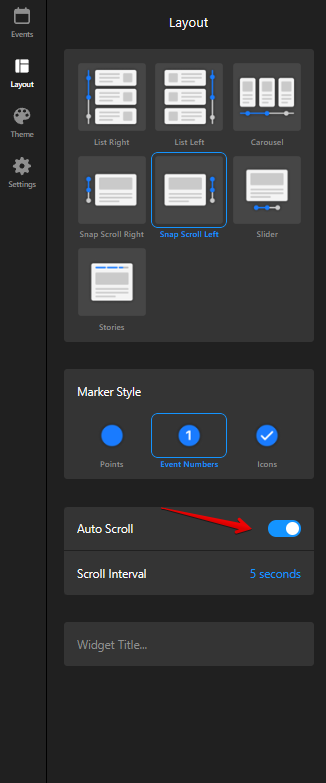
You can disable the Autoscroll on the Layout tab of your widget’s settings:


Let me know if you have any further questions :slightly_smiling_face:

1 Like

Sorry, not sure if I explained it correctly. We like the auto-scroll features, but don’t want the page to scroll down to when the auto-scroll moves from the first item to the second. Here’s a screen recording of how the page scrolls down to the timeline widget when the widget cycles from the first item to the second.

2 Likes

Thanks for sharing a screencast!

Do I get it right that the Autoscroll should be triggered only when the widget is fully visible in the viewport?

1 Like

No, I’d like the auto-scroll to work in the background (even when the widget is not fully visible), but not have the page scroll down when the auto-scroll is moving from one item to another. Currently, the user is taken down to the widget forcefully (though they are not ready to scroll yet) as they are reading the copy in the header, and this is because the auto-scroll in the widget is moving from the first item to the second, and forcing the user to see the widget instead. I’m so sorry, this is quite hard to explain. Hope I am making sense. :confused:

2 Likes

Got you, thanks!

Please let me discuss with the devs if it’s possible to achieve this. I’ll get back to you as soon as I have their response :slightly_smiling_face:

1 Like

We’ve applied a fix using this code in the Custom JS field on the Setting tab of your widget’s settings:

Element.prototype.scrollIntoView = function() {};

window.scrollTo = () => {};
window.scrollBy = () => {};

Please check your website and let me know if it’s fine now :slightly_smiling_face:

3 Likes

Yes, that works great!! Thank you so much for the quick turnaround! Appreciate you and your devs help on this. :slight_smile:

3 Likes

No sweat :wink:

1 Like