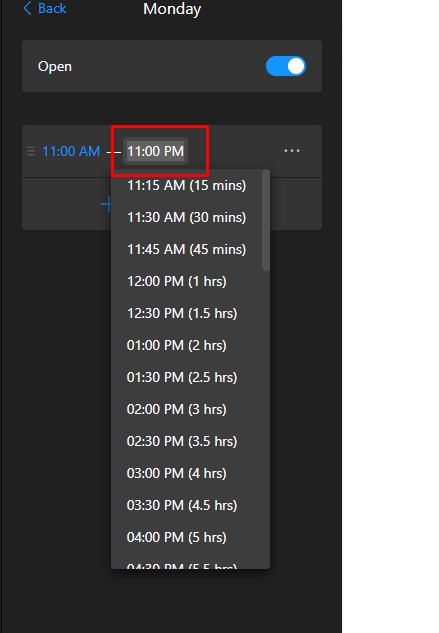
My customer wants to be able to have an opening time but then they dont always close the pub at 11pm because if it is quiet they close early - so they are asking for the word “Close” instead of the closing time.
I appreciate difficulties with this but its a request!
Max
November 10, 2025, 11:33am
3
Hi there, @user5844
Glad to say that you can do this in the Edit Texts section on the Settings tab:
Just remove time when needed and replace the default phrases with your own. Please check it out and let me know if it helped
Wow ok thanks - i cant get it to work though?
are you saying i can change this 11:00PM to say Close ? that is awesome if i can so please detail for a thicky !!
Max
November 10, 2025, 12:54pm
5
At the moment, it’s impossible to choose only the start hours in the Working Hours section.
However, I see that currently your widget shows Open until 23:00 :
If you want to replace Open until 23:00 with Closed, you can:
Manually disable the Open Status and then enable it when needed:
Replace Open Until time with Closed in the Edit Texts section:
Please try it out and let me know if it works for your needs
thanks for trying on this Max, very much appreciated. The issue they have is that they sometimes close early if the weather is poor or they are just very quiet so they want to put the word “Close” instead of a specific time so someone doesnt look at it and think they are definitely open till 11pm
so they would want it to say:
Monday 11:00 - Close
etc
so if i am reading your instruction right this isnt possible just yet?
so
Max
November 10, 2025, 3:14pm
7
Got it, thanks! There are 2 options in this case:
Manually change the end time for a specific to the new time when it will be closed:
If you’d like to display the start time and replace the end time with the Close text, here is the code for you:
/* Sunday */
.global-styles,
[class*='schedule-item__Hours-sc']:nth-child(2)
  [class*='schedule-work-hours__Item-sc']::after {
  content: '11:00 - 23:00';
  font-size: 14px;
}

.global-styles,
[class*='schedule-item__Hours-sc']:nth-child(2)
  [class*='schedule-work-hours__Item-sc'] {
  font-size: 0;
}

/* Monday */
.global-styles,
[class*='schedule-item__Hours-sc']:nth-child(4)
  [class*='schedule-work-hours__Item-sc']::after {
  content: '11:00 - Closed';
  font-size: 14px;
}

.global-styles,
[class*='schedule-item__Hours-sc']:nth-child(4)
  [class*='schedule-work-hours__Item-sc'] {
  font-size: 0;
}

/* Tuesday */
.global-styles,
[class*='schedule-item__Hours-sc']:nth-child(6)
  [class*='schedule-work-hours__Item-sc']::after {
  content: '11:00 - 23:00';
  font-size: 14px;
}

.global-styles,
[class*='schedule-item__Hours-sc']:nth-child(6)
  [class*='schedule-work-hours__Item-sc'] {
  font-size: 0;
}

/* Wednesday */
.global-styles,
[class*='schedule-item__Hours-sc']:nth-child(8)
  [class*='schedule-work-hours__Item-sc']::after {
  content: '11:00 - 23:00';
  font-size: 14px;
}

.global-styles,
[class*='schedule-item__Hours-sc']:nth-child(8)
  [class*='schedule-work-hours__Item-sc'] {
  font-size: 0;
}

/* Thursday */
.global-styles,
[class*='schedule-item__Hours-sc']:nth-child(10)
  [class*='schedule-work-hours__Item-sc']::after {
  content: '11:00 - 23:00';
  font-size: 14px;
}

.global-styles,
[class*='schedule-item__Hours-sc']:nth-child(10)
  [class*='schedule-work-hours__Item-sc'] {
  font-size: 0;
}

/* Friday */
.global-styles,
[class*='schedule-item__Hours-sc']:nth-child(12)
  [class*='schedule-work-hours__Item-sc']::after {
  content: '11:00 - 23:00';
  font-size: 14px;
}

.global-styles,
[class*='schedule-item__Hours-sc']:nth-child(12)
  [class*='schedule-work-hours__Item-sc'] {
  font-size: 0;
}

/* Saturday */
.global-styles,
[class*='schedule-item__Hours-sc']:nth-child(14)
  [class*='schedule-work-hours__Item-sc']::after {
  content: '11:00 - 23:00';
  font-size: 14px;
}

.global-styles,
[class*='schedule-item__Hours-sc']:nth-child(14)
  [class*='schedule-work-hours__Item-sc'] {
  font-size: 0;
}
Just copy the part of the code for the needed day and paste it to the Custom CSS field on the Style tab of your widget’s settings. For example, here is the code just for Monday:
/* Monday */
.global-styles,
[class*='schedule-item__Hours-sc']:nth-child(4)
  [class*='schedule-work-hours__Item-sc']::after {
  content: '11:00 - Closed';
  font-size: 14px;
}

.global-styles,
[class*='schedule-item__Hours-sc']:nth-child(4)
  [class*='schedule-work-hours__Item-sc'] {
  font-size: 0;
}
Give it a try and let me know if you like the result
Wow thats amazing thank you very much! I am pretty sure that is what they wanted to achieve yes!
thanks
Max
November 10, 2025, 5:31pm
9
Great, you’re always welcome