To add Image to Portfolio Pagination, like this.

#1. First, use this code to Custom CSS.
if you have problem with installing the code, you can message me, I will help you.
/* Blog pagination */
.pagination-title-wrapper {
    display: flex;
    align-items: center;
}
.pagination-title-wrapper img {
    margin-right: 10px;
    margin-bottom: 0px !important;
    height: 100% !important;
}
a[class*="--next"] .pagination-title-wrapper {
    flex-direction: row-reverse;
}
a[class*="--next"] .pagination-title-wrapper img {
    margin-right: 0px;
    margin-left: 10px;
}
.pagination-title-wrapper * {
    font-size: 20px !important;
}

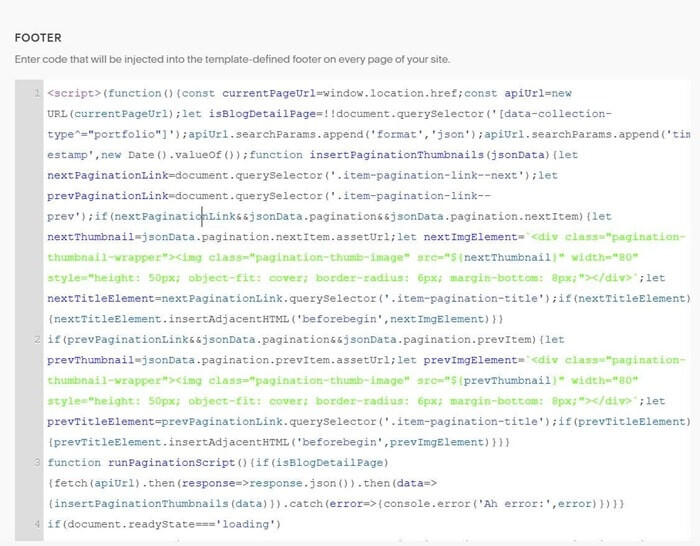
#2. Use this code to Code Injection > Footer
<script>(function(){const currentPageUrl=window.location.href;const apiUrl=new URL(currentPageUrl);let isBlogDetailPage=!!document.querySelector('[data-collection-type^="portfolio"]');apiUrl.searchParams.append('format','json');apiUrl.searchParams.append('timestamp',new Date().valueOf());function insertPaginationThumbnails(jsonData){let nextPaginationLink=document.querySelector('.item-pagination-link--next');let prevPaginationLink=document.querySelector('.item-pagination-link--prev');if(nextPaginationLink&&jsonData.pagination&&jsonData.pagination.nextItem){let nextThumbnail=jsonData.pagination.nextItem.assetUrl;let nextImgElement=`<div class="pagination-thumbnail-wrapper"><img class="pagination-thumb-image" src="${nextThumbnail}" width="80" style="height: 50px; object-fit: cover; border-radius: 6px; margin-bottom: 8px;"></div>`;let nextTitleElement=nextPaginationLink.querySelector('.item-pagination-title');if(nextTitleElement){nextTitleElement.insertAdjacentHTML('beforebegin',nextImgElement)}}
if(prevPaginationLink&&jsonData.pagination&&jsonData.pagination.prevItem){let prevThumbnail=jsonData.pagination.prevItem.assetUrl;let prevImgElement=`<div class="pagination-thumbnail-wrapper"><img class="pagination-thumb-image" src="${prevThumbnail}" width="80" style="height: 50px; object-fit: cover; border-radius: 6px; margin-bottom: 8px;"></div>`;let prevTitleElement=prevPaginationLink.querySelector('.item-pagination-title');if(prevTitleElement){prevTitleElement.insertAdjacentHTML('beforebegin',prevImgElement)}}}
function runPaginationScript(){if(isBlogDetailPage){fetch(apiUrl).then(response=>response.json()).then(data=>{insertPaginationThumbnails(data)}).catch(error=>{console.error('Ah error:',error)})}}
if(document.readyState==='loading'){document.addEventListener('DOMContentLoaded',runPaginationScript)}else{runPaginationScript()}}());</script>