Based on the insights from this thread (kudos to @Sina and @Aleksandr_Popov) , we’ve created a simple guide on how to send notifications for new form submissions to Telegram
Register your Telegram Bot
First, open BotFather on Telegram. You can find it by searching for “BotFather” in the Telegram search bar.
Start a chat with BotFather and type /newbot to create a new bot.
BotFather will ask you for two things:
Bot name: This is the display name of your bot.
Bot username: This should be unique and end with “bot” (e.g., MyAwesomeBot).
After providing this information, BotFather will generate a bot token. Keep this token handy, as you’ll use it to interact with your bot programmatically
Once you have the bot token and the user ID, you’re ready to create a form and start sending messages from your bot
Adding a custom code
Here is a custom code to send notifications about new submissions to your Telegram channel:
const TELEGRAM_BOT_TOKEN = 'YOUR_TOKEN';
const TELEGRAM_CHAT_ID = 'CHAT_ID';

widget.on('submit', (fields) => {
	let text = '';
	Object.values(fields).forEach((field) => {
		if (field.value && field.type !== 'consent') {
			text += `${field.name}: ${field.value}\n`;
		}
	});

	fetch(`https://api.telegram.org/bot${TELEGRAM_BOT_TOKEN}/sendMessage`, {
		method: 'POST',
                keepalive: true,
		headers: {
			'Content-Type': 'application/json',
		},
		body: JSON.stringify({
			chat_id: TELEGRAM_CHAT_ID,
			text,
		}),
	}).catch(() => {
		console.error(`Form: the message wasn't sent to Telegram.`);
	});
});
Replace YOUR_TOKEN and CHAT_ID with your Telegram Bot Token and Chat ID and add the resulted code to the Custom JS field on the Settings tab of your Form widget’s settings.
Voila! Now you’ll receive notifications about new form submissions in your Telegram Channel:
Thanks, Max. It works! One thing worth noting, especially for those unfamiliar with Telegram: after creating your bot, if using your personal Telegram ID, you need to start a chat with it by finding it in the search bar and sending the /start command. Otherwise, it won’t be able to send you any submissions.
You can also make a group and add the bot to it. But there are a few settings you need to update, namely:
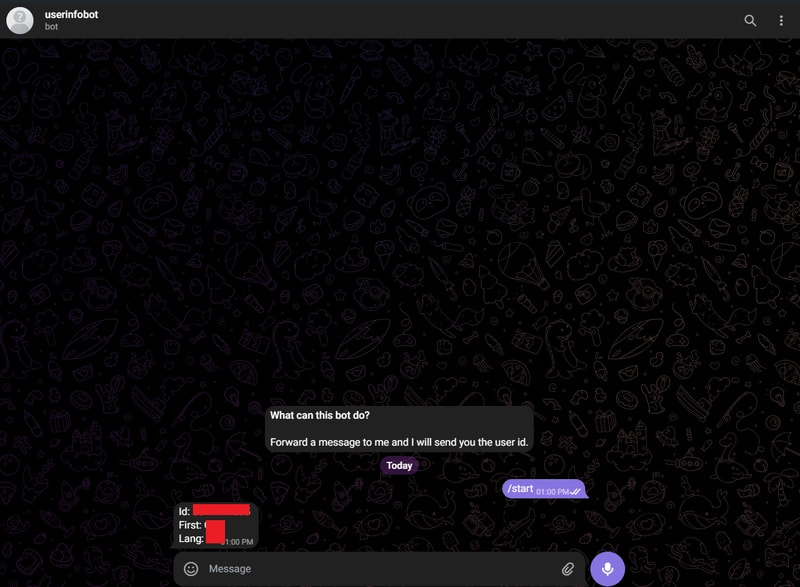
Use the correct group chat ID – you can find this via the userinfobot. Make sure you do this after you tweak your group settings as some settings change your group ID (e.g., the chat history for new members setting).
Turn off Privacy Mode in BotFather: /mybots → select your bot → Bot Settings → Group Privacy → Turn off. This allows the bot to see messages and send updates in the group.
Send an initial message in the group after adding the bot, so it’s “activated” and can receive and post messages.
Changing the Post-Submit Action of my form (installed on this page) from Show Success Message to Redirect to URL also appears to have broken this script. Any idea why that might have happened? I just tested it and my other form still sends notifications to Telegram fine.
Just to confirm, you’ve sent /start in the chat with the Telegram bot, right?
We’ve also noticed that you’ve added the CHAT_ID of the group instead of the user. You should replace with the Chat ID of the user (you) and send /start in the chat with the Telegram bot on your behalf.
If it doesn’t help, please right-click the widget on your website, choose Inspeact and open the Send Message section on the Network tab:
I just tested it and it’s working again now! I successfully received a telegram bot message for the submission. I’m not sure what the issue was but it seems to have fixed itself.
I appreciate your continued support and assistance.
Hi Max, the issue persisted after my last reply. I thought I’d try my luck and described the issue to ChatGPT. It proposed I add this line:
keepalive: true,
That has done the trick! I’ve been reliably receiving form submission via telegram since
The issue was that upon changing my form to redirect to another page upon submission, customers on slower connections may have been redirected before the JS could completely execute. That addition seems to keep the script going regardless.