Hi again,
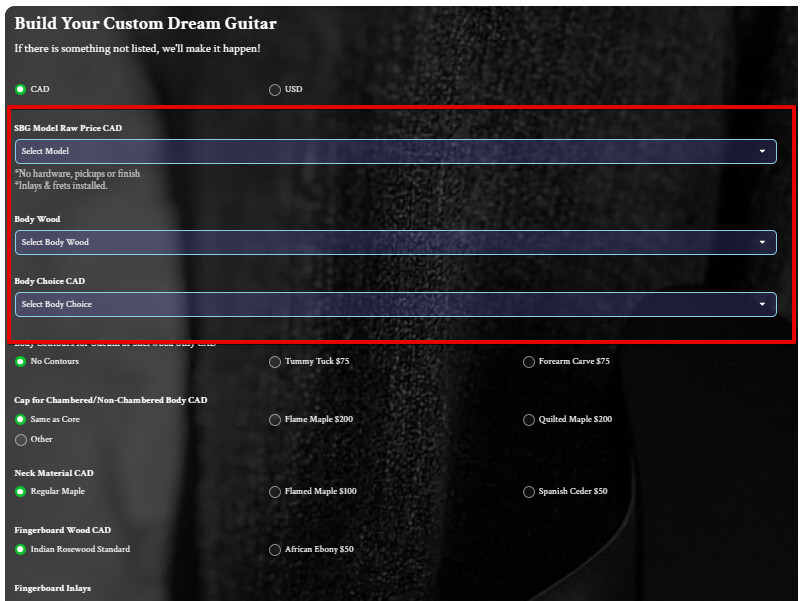
My calculator is getting very close. I was wondering if I can setup drop-downs in a row of 2.@Sina but it only worked with the choice radio buttons
[class*=“choice__OptionsContainer-sc”]{
Thanks,
Max
May 28, 2025, 12:45pm
3
Hi there, @William62
Do I get it right that you’d like to apply it to the first 3 dropdowns (2 dropdowns in 1 line and the 3rd dropdown below)?
Hi Max,
Yes thats what I’d like to try.
Thank you,
Max
May 28, 2025, 3:36pm
5
Our devs recommended using the code that will work on devices with the screen width from 800px, since this customization won’t look neat on the narrower screens:
@media(min-width: 800px) {
  [class*="form__FieldLayout-sc"]:nth-child(2),
  [class*="form__FieldLayout-sc"]:nth-child(3) {
    display: inline-grid;
    width: calc(50% - 5px);
  }

  [class*="form__FieldLayout-sc"]:nth-child(2) {
    margin-right: 10px;
  }
}
However, if you’d like to apply this change for all screen widths, you can use this code
[class*="form__FieldLayout-sc"]:nth-child(2),
[class*="form__FieldLayout-sc"]:nth-child(3) {
  display: inline-grid;
  width: calc(50% - 5px);
}

[class*="form__FieldLayout-sc"]:nth-child(2) {
  margin-right: 10px;
}
Thanks again Max,
Thanks,