Matthew7
October 8, 2025, 6:20pm
1
This is great!
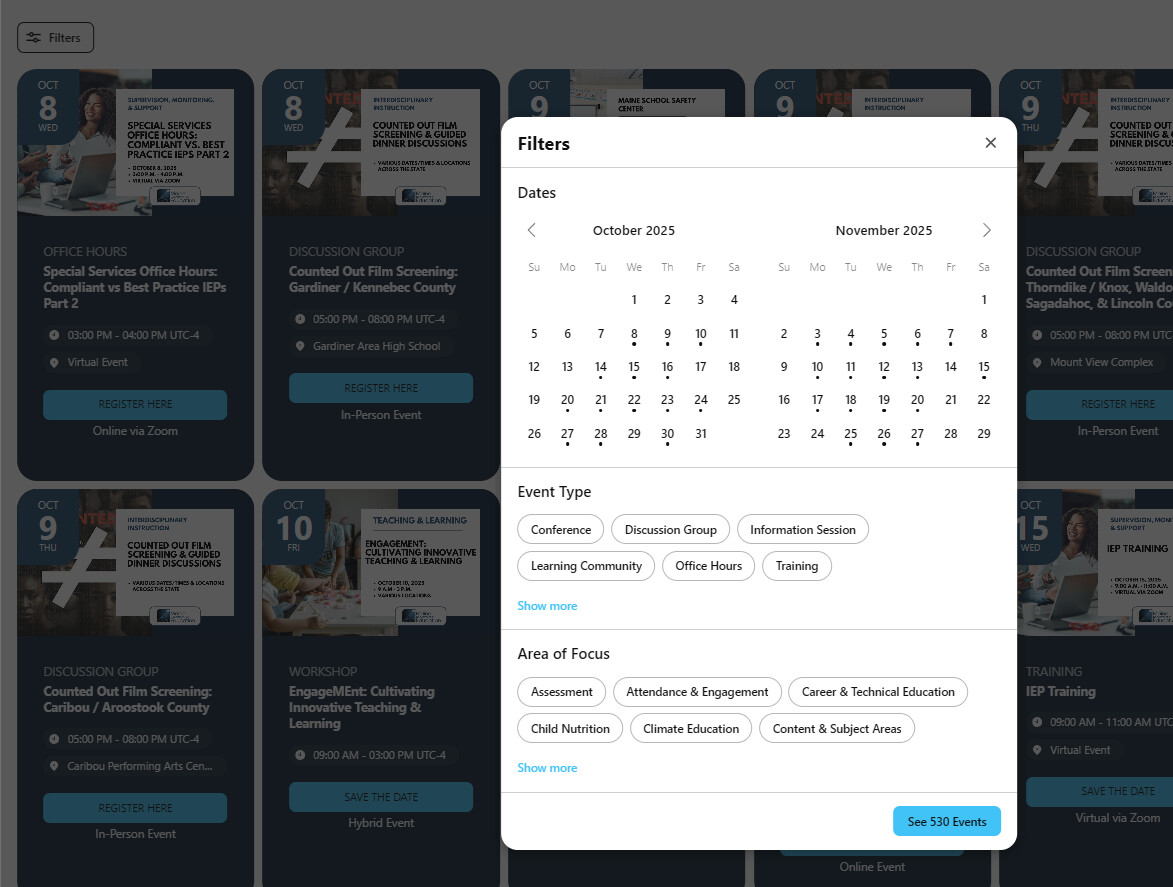
Is there any way to make the default for the filters ‘show all’ – we liked the list format because they are areas of focus for us, and I just don’t want people to miss out or feel a certain way that their area is not featured in the same way. (or is there a way to go back to the list format) ?
Thanks!
Max
October 8, 2025, 6:51pm
2
Hi there, @Matthew7
Thank you for the feedback!
Do you mean that filters now appear in the popup?
If so, you can easily switch it back to the inline display on the Filters tab:
Or do you need to display all filter options right away without a Show More button in the Inline view?
Matthew7
October 9, 2025, 3:45pm
3
Yes, but before, it was a full list vs bubbles next to each other, that is fine, but the “show more” hides a large amount of data. I tried both versions and they do that. If we could expose the show more that would be very helpful. Before you could just scroll to see.
Max
October 9, 2025, 4:25pm
4
Hi @Matthew7
I guess it’s possible to display all filter options without a Show More button. I’ve asked the devs to share a custom solution and will get back to you tomorrow
Max
October 10, 2025, 10:07am
5
Hi @Matthew7
Our devs will try to create a custom solution. I’ll update you once it’s ready
Max
October 13, 2025, 1:13pm
7
Hi there, @Matthew7
Thank you for waiting!
To display all filter options without a Show More button, please:
Add this code to the Custom CSS field on the Style tab of your widget’s settings:
.global-styles,
.es-more-less-button-button {
  display: none;
}
Paste this script to the Custom JS field on the Settings tab of your widget’s settings:
(function() {
  const popupObserver = new MutationObserver((mutations) => {
    for (const mutation of mutations) {
      for (const node of mutation.addedNodes) {
        if (
          node.nodeType !== Node.ELEMENT_NODE ||
          !node.matches?.('[class*="Popup__PopupWrapper-sc"]')
        ) {
          return;
        }

        const showMoreButtons = node.querySelectorAll(
          '.es-more-less-button-button'
        );

        showMoreButtons.forEach((button) => {
          button.click();
        });
      }
    }
  });

  popupObserver.observe(document.body, {
    childList: true,
  });
})();
Check it out and let me know if you like the result
Tender_S
October 16, 2025, 7:28am
9
I’ll make it too. In my case, this button is also superfluous.
Tender_S
October 16, 2025, 7:32am
10
Hmmm, I added this 2 codes to the Custom CSS and Custom JS, but without result. The button “MORE” is still there https://m-pro.net.ru/raspisanie-kvizov-tambova/
Max
October 16, 2025, 10:16am
11
Hi there, @Tender_S
Please let me check it with the devs. I’ll let you know once I have their response
Max
October 16, 2025, 11:15am
12
The previous JS script is meant for filter with the Popup filter layout only. Since you’re using the Inline layout for filters, we’ve added a different script to the Custom JS field:
(function () {
    const WIDGET_ID = '2c9182b3-4421-4451-9b83-2374f2f310f1';

    const clickShowMoreButton = (filtersContainer) => {
        const showMoreButtons = filtersContainer.querySelectorAll(
            '.es-more-less-button-button'
        );

        showMoreButtons.forEach((button) => {
            if (button.textContent === 'Показать больше') {
                button.click();
            }
        });
    };

    const addFiltersHandler = () => {
        const filtersContainer = document.body.querySelector(
            `.elfsight-app-${WIDGET_ID} .eapp-events-calendar-controls-component`
        );

        if (!filtersContainer) {
            requestAnimationFrame(addFiltersHandler);
            return;
        }

        const inlineFiltersObserver = new MutationObserver(() => {
            clickShowMoreButton(filtersContainer);
        });

        inlineFiltersObserver.observe(filtersContainer, {
            childList: true,
            subtree: true,
        });

        const popupFiltersObserver = new MutationObserver((mutations) => {
            for (const mutation of mutations) {
                for (const node of mutation.addedNodes) {
                    if (
                        node.nodeType !== Node.ELEMENT_NODE ||
                        !node.matches?.('[class*="Popup__PopupWrapper-sc"]')
                    ) {
                        continue;
                    }

                    clickShowMoreButton(node);
                }
            }
        });

        popupFiltersObserver.observe(document.body, {
            childList: true,
        });
    };

    addFiltersHandler();
})(
);
Please check your website and let me know how it works
Tender_S
October 16, 2025, 11:24am
13
Max:
(function () {
    const WIDGET_ID = '2c9182b3-4421-4451-9b83-2374f2f310f1';

    const clickShowMoreButton = (filtersContainer) => {
        const showMoreButtons = filtersContainer.querySelectorAll(
            '.es-more-less-button-button'
        );

        showMoreButtons.forEach((button) => {
            if (button.textContent === 'Показать больше') {
                button.click();
            }
        });
    };

    const addFiltersHandler = () => {
        const filtersContainer = document.body.querySelector(
            `.elfsight-app-${WIDGET_ID} .eapp-events-calendar-controls-component`
        );

        if (!filtersContainer) {
            requestAnimationFrame(addFiltersHandler);
            return;
        }

        const inlineFiltersObserver = new MutationObserver(() => {
            clickShowMoreButton(filtersContainer);
        });

        inlineFiltersObserver.observe(filtersContainer, {
            childList: true,
            subtree: true,
        });

        const popupFiltersObserver = new MutationObserver((mutations) => {
            for (const mutation of mutations) {
                for (const node of mutation.addedNodes) {
                    if (
                        node.nodeType !== Node.ELEMENT_NODE ||
                        !node.matches?.('[class*="Popup__PopupWrapper-sc"]')
                    ) {
                        continue;
                    }

                    clickShowMoreButton(node);
                }
            }
        });

        popupFiltersObserver.observe(document.body, {
            childList: true,
        });
    };

    addFiltersHandler();
})(
);
Tak, I’m trying this version. Yes, the button has disappeared
But… But now not all the options are visible. It probably needs to be finalized again)
Max
October 16, 2025, 11:27am
14
Yep, this is how the solution should work. The codes hide the Show More button and displays all filter options right away.
Could you please elaborate on your use case and describe what you’d like to achieve?
Tender_S
October 16, 2025, 11:34am
15
Oh, sorry, it works correctly. I refreshed the page and all is good
Max:
(function() {
  const popupObserver = new MutationObserver((mutations) => {
    for (const mutation of mutations) {
      for (const node of mutation.addedNodes) {
        if (
          node.nodeType !== Node.ELEMENT_NODE ||
          !node.matches?.('[class*="Popup__PopupWrapper-sc"]')
        ) {
          return;
        }

        const showMoreButtons = node.querySelectorAll(
          '.es-more-less-button-button'
        );

        showMoreButtons.forEach((button) => {
          button.click();
        });
      }
    }
  });

  popupObserver.observe(document.body, {
    childList: true,
  });
})();
Summary
This text will be hidden
Hi Max,
I tried adding this code to my widget and while it hides the ‘Show More’ button, it doesn’t display all the filters. There should be 9 Movie Titles and it’s only displaying 6. Can you check it out for me?
Max
November 7, 2025, 6:21am
18
Hi there, @Tennessee_Williams_T
I’ve checked your widget and see that all filter options show up without a Read More button by default:
However, if you’re going to add more event types, the code I’ve shared should work for this case. I’ve noticed that you’ve copied just a part of the code to your widget. Here is a full version:
(function () {
    const WIDGET_ID = 'YOUR_WIDGET_ID';

    const clickShowMoreButton = (filtersContainer) => {
        const showMoreButtons = filtersContainer.querySelectorAll(
            '.es-more-less-button-button'
        );

        showMoreButtons.forEach((button) => {
            if (button.textContent === 'Показать больше') {
                button.click();
            }
        });
    };

    const addFiltersHandler = () => {
        const filtersContainer = document.body.querySelector(
            `.elfsight-app-${WIDGET_ID} .eapp-events-calendar-controls-component`
        );

        if (!filtersContainer) {
            requestAnimationFrame(addFiltersHandler);
            return;
        }

        const inlineFiltersObserver = new MutationObserver(() => {
            clickShowMoreButton(filtersContainer);
        });

        inlineFiltersObserver.observe(filtersContainer, {
            childList: true,
            subtree: true,
        });

        const popupFiltersObserver = new MutationObserver((mutations) => {
            for (const mutation of mutations) {
                for (const node of mutation.addedNodes) {
                    if (
                        node.nodeType !== Node.ELEMENT_NODE ||
                        !node.matches?.('[class*="Popup__PopupWrapper-sc"]')
                    ) {
                        continue;
                    }

                    clickShowMoreButton(node);
                }
            }
        });

        popupFiltersObserver.observe(document.body, {
            childList: true,
        });
    };

    addFiltersHandler();
})(
);
Do not forget to replace YOUR_WIDGET_ID in the 2nd line of the code with the ID of your widget .
Give it a try and let me know how it worked
Hi Max, I updated the code and added more event types but they are still not showing. Any ideas?
Max
November 10, 2025, 12:18pm
20
Hi there, @Tennessee_Williams_T
I’ve reached out to the devs and they’ve slightly adjusted the code in your widget and it’s working fine now:
(function() {
  const WIDGET_ID = 'd14d054f-168b-4dd7-a5e3-572f3b4a52c6';

  const clickShowMoreButton = (filtersContainer) => {
    const showMoreButtons = filtersContainer.querySelectorAll(
      '.es-more-less-button-button'
    );

    showMoreButtons.forEach((button) => {
      if (button.textContent === 'Show more') {
        button.click();
      }
    });
  };

  const addFiltersHandler = () => {
    const filtersContainer = document.body.querySelector(
      `.elfsight-app-${WIDGET_ID} .eapp-events-calendar-controls-component`
    );

    if (!filtersContainer) {
      requestAnimationFrame(addFiltersHandler);
      return;
    }

    const inlineFiltersObserver = new MutationObserver(() => {
      clickShowMoreButton(filtersContainer);
    });

    inlineFiltersObserver.observe(filtersContainer, {
      childList: true,
      subtree: true,
    });

    const popupFiltersObserver = new MutationObserver((mutations) => {
      for (const mutation of mutations) {
        for (const node of mutation.addedNodes) {
          if (
            node.nodeType !== Node.ELEMENT_NODE ||
            !node.matches?.('[class*="Popup__PopupWrapper-sc"]')
          ) {
            continue;
          }

          clickShowMoreButton(node);
        }
      }
    });

    popupFiltersObserver.observe(document.body, {
      childList: true,
    });
  };

  addFiltersHandler();
})();
The code didn’t work because you’re using a different text for the Show More button compaing to Tender’s case:
So, we’ve just changed the text of the Show More button. Please check it out and let me know if it’s fine now
Awesome! You rock, thank you so much, Max!
Max
November 10, 2025, 6:27pm
22
It’s my pleasure!
Don’t hesitate to contact us here again if anything else comes up